


Difference Between Spam and Phishing: 7 Warning Signs Every Email User Should Know
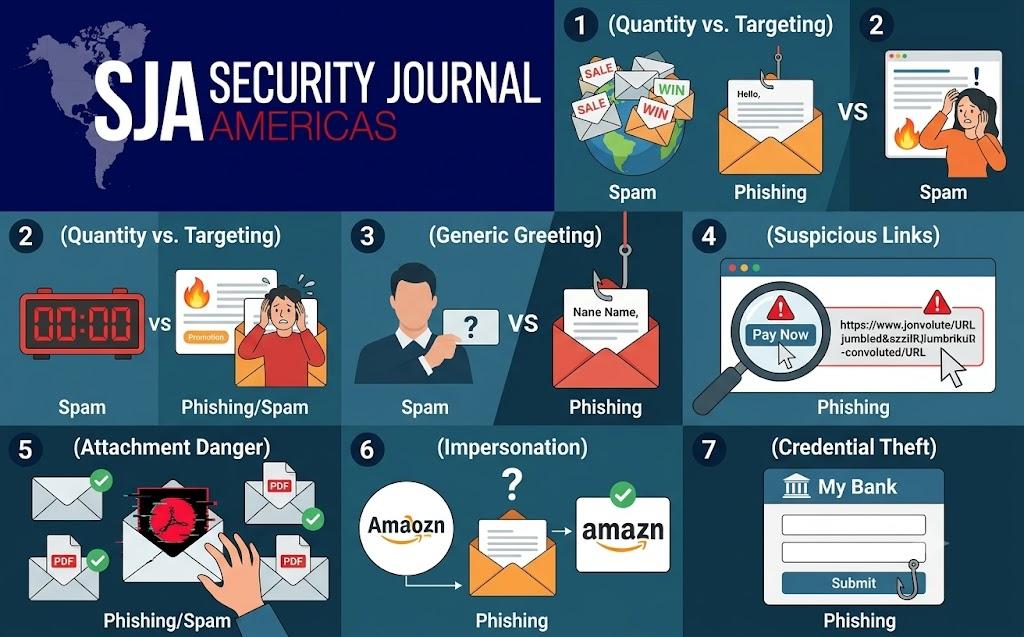
Email remains one of the most vital communication channels in both personal and professional spheres. Every day, billions of messages crisscross the globe, delivering work updates, promotional offers, newsletters, and personal notes. However, this convenience comes with a significant downside: an unending torrent of unwanted and malicious communications. Among these unsolicited emails, two terms are often mentioned in the same breath, leading many users to assume they are identical. Understanding the distinct difference between spam and phishing is crucial for maintaining digital security and protecting sensitive personal information.
While both invade your inbox without permission, their underlying motivations, techniques, and potential consequences differ substantially. Treating a dangerous phishing attempt like a harmless promotional message can open the door to identity theft, financial loss, or compromised personal accounts. Conversely, confusing general promotional clutter with targeted cyber threats can cause unnecessary alarm. By recognizing the critical distinction between these two forms of inbox intrusion and learning the key warning signs, email users can navigate their digital environment with confidence.
Defining the Ingestion: Unsolicited Messages vs. Malicious Intent
To understand the core difference between spam and phishing, it is essential to break down what each term represents in the context of digital communication.
What is Spam?
Spam refers to unsolicited bulk email. It is the digital equivalent of junk mail dropped into your physical mailbox. The primary motivation behind spam is almost always commercial advertising. Promoters send millions of identical or nearly identical messages promoting low-cost products, discount medications, online courses, software subscriptions, or promotional deals.
The key characteristics of standard spam include:
-
Bulk Distribution: Sent indiscriminately to massive lists of harvested or purchased email addresses.
-
Low Personalization: Generic greetings and broad appeals designed to capture the attention of a fraction of a percent of recipients.
-
Nuisance Factor: Primarily consumes storage, clutters inboxes, and reduces productivity rather than seeking to directly compromise user security.
-
Commercial Goal: Focused on selling a product, driving website traffic, or generating affiliate marketing revenue.
What is Phishing?
Phishing, on the other hand, is a targeted cyber attack designed to deceive recipients into revealing sensitive information or taking harmful actions. Rather than trying to sell a product, a phishing email attempts to impersonate a trusted entity—such as a bank, utility provider, online service, government agency, or colleague—to trick the recipient.
The primary objectives of phishing include:
-
Credential Harvesting: Stealing login usernames and passwords for online banking, social media, or work portals.
-
Financial Theft: Tricking users into transferring funds directly or disclosing credit card numbers.
-
Malware Deployment: Inducing users to click malicious links or open attachments that install spyware, keyloggers, or ransomware on their devices.
-
Identity Theft: Collecting personal identification numbers, social security records, or confidential documentation.
Core Comparison Matrix
| Feature | Spam | Phishing |
| Primary Goal | Commercial advertising and marketing sales | Deception, credential theft, and system compromise |
| Volume & Scope | Massive bulk distribution to indiscriminate lists | Can be targeted (spear phishing) or widespread |
| Risk Level | Low (primarily an annoyance or nuisance) | High (severe risk of financial and identity theft) |
| Tactic | Annoyance through volume | Deception, psychological manipulation, and urgency |
| Action Sought | Purchasing a product or clicking an ad link | Entering credentials, transferring money, or opening infected files |
The 7 Warning Signs Every Email User Should Know
Distinguishing a harmless commercial message from a dangerous cyber trap requires a trained eye. Recognizing these seven warning signs will help you identify threats before any harm occurs.
1. High-Pressure Urgency and Threat Tactics
One of the clearest indicators of the difference between spam and phishing is the emotional pressure applied by the sender. Traditional spam aims to entice you with deals, but phishing relies on fear, panic, and extreme urgency to override your critical thinking.
Phishing emails frequently employ phrases like:
-
"Your account will be suspended within 24 hours!"
-
"Immediate action required: Unauthorized login detected."
-
"Failure to respond will result in permanent account termination."
Attackers create artificial time constraints so that users act immediately out of fear rather than stopping to verify the request through secondary channels.
2. Suspicious Sender Domain and Mismatched Addresses
Always inspect the actual email address behind the displayed sender name. A legitimate organisation usually sends communications from an email domain matching its official website.
Phishing emails often employ deceptive domain tricks:
-
Typosquatting: Subtly misspelled domains where letters are swapped or added (e.g., replacing an 'm' with 'rn' or adding extra letters).
-
Generic Free Email Providers: Official notifications sent from free webmail accounts (e.g.,
@gmail.comor@yahoo.com) claiming to represent major financial institutions or corporate support teams. -
Mismatched Sender Name and Address: The display name claims to be a trusted entity, but hovering over or expanding the header reveals an entirely unrelated or random email address.
Standard spam may come from unknown domains, but phishing specifically attempts to trick you into believing the email comes from an entity you already trust.
3. Generic Salutations and Missing Specifics
Because spam and widespread phishing attacks are sent out in vast quantities, attackers often lack personalized recipient data.
Watch out for generic greetings such as:
-
"Dear Customer"
-
"Dear Valued Member"
-
"Attention Account Holder"
While automated promotional newsletters might occasionally use generic greetings, legitimate financial institutions, government departments, and primary service providers with whom you hold an account almost always address you by your full registered name.
4. Malicious Hyperlinks and Deceptive URLs
Hyperlinks are the primary delivery vehicle for phishing attacks. A hyperlink can display text that reads like an official website address while hiding a malicious destination link underneath.
To verify a link safely:
-
Hover Without Clicking: Position your mouse cursor over the link to display the actual destination URL in the bottom corner of your browser or email client.
-
Examine the Root Domain: Look at the main domain name before the final slash. For example,
[http://login.legitimate-service.com.attacker-domain.com](http://login.legitimate-service.com.attacker-domain.com)leads toattacker-domain.com, not the legitimate service. -
Look for HTTPS Protocols: While HTTPS alone does not guarantee safety, unencrypted HTTP links requesting login credentials are a massive red flag.
Spam links usually lead to shady e-commerce stores, affiliate landing pages, or ad networks. Phishing links lead to counterfeit login portals designed to steal your credentials.
5. Unsolicited Attachments with Risky Extensions
Standard commercial spam rarely includes attachments, relying instead on images and links to drive sales traffic. Phishing emails, however, frequently utilize dangerous file attachments as direct vehicles for malware payload delivery.
Be extremely cautious with attachments that:
-
Use double extensions (e.g.,
invoice.pdf.exe). -
Ask you to enable macros inside spreadsheet or word processing documents (
.docm,.xlsm). -
Use compressed archives (
.zip,.rar,.7z) to bypass basic security scanners. -
Arrive unexpectedly with filenames claiming to be "Invoices," "Shipping Labels," "Overdue Payment Notices," or "Legal Demands."
Opening an infected attachment can execute malicious code in the background, compromising your operating system and compromising personal files.
6. Requests for Personal or Financial Information
A fundamental rule of digital hygiene is that reputable organisations will never ask you to send sensitive information directly via an unencrypted email reply or through an unverified form link.
Be on high alert if an incoming email asks for:
-
Passwords, PINs, or security question answers.
-
Full credit card details, CVV codes, or banking credentials.
-
Social security or personal identity numbers.
-
Wire transfers, gift card purchases, or cryptocurrency payments.
While spam attempts to persuade you to buy something voluntarily, phishing actively seeks to extract confidential access keypairs and private identity metrics under false pretenses.
7. Poor Grammar, Spelling, and Formatting Errors
While modern phishing attacks are becoming increasingly sophisticated, many still contain noticeably poor grammar, awkward phrasing, and unconventional formatting.
These errors often occur because:
-
The attackers operate internationally and translate text using automated translation tools.
-
Attackers deliberately include minor typos to evade automated spam and phishing keywords filters.
-
Bad visual layouts, mismatched fonts, low-resolution logos, and broken alignment indicate a lack of professional design standards.
While occasional typos happen in routine emails, official communications from established entities undergo strict quality reviews before distribution.
Best Practices for Protecting Your Digital Identity
Understanding the difference between spam and phishing is the first line of defense; applying active protection strategies completes your security posture.
-
Enable Multi-Factor Authentication (MFA): Even if a phishing attack successfully captures your password, MFA provides a critical second layer of defense, preventing unauthorized access.
-
Never Click Unverified Links: If you receive an urgent notice regarding an account, navigate directly to the official website via a saved bookmark or search engine rather than clicking the link inside the message.
-
Keep Software Updated: Regularly update your web browsers, operating systems, and email clients to ensure you have the latest security patches.
-
Use Advanced Email Filtering: Ensure your email platform's automated spam and threat filters are enabled to intercept suspicious messages before they reach your primary inbox.
-
Verify Requests Out-of-Band: If a message claims to come from a known colleague or company asking for sensitive actions, confirm the request using a different communication channel, such as a direct telephone call.
In the insights shared by Security Journal Americas, staying informed and adopting a proactive mindset remains the single best strategy for defending against evolving inbox threats.
Frequently Asked Questions
1: Can opening a spam or phishing email infect my device?
Simply opening a text-based email rarely infects your device. Modern email clients render plain text safely. The danger lies in interacting with the contents of the email—such as clicking embedded links, downloading attachments, enabling macros, or replying with sensitive information. However, to stay fully protected, ensure your email client is set to block automatic downloading of remote images, as attackers can use remote images to confirm your address is active.
2: What should I do if I accidentally clicked a phishing link?
If you clicked a link and entered credentials, immediately change the passwords for that account and any other accounts that use the same password. Enable multi-factor authentication (MFA) immediately if it is not already active. Run a full antivirus and malware scan on your device. Additionally, keep a close watch on your financial accounts and credit reports for any suspicious activity.
3: Why do spam and phishing emails keep bypassing my inbox filters?
Spam and phishing techniques evolve constantly. Attackers frequently change sending domains, use compromised legitimate servers, alter message text, and hide malicious URLs inside redirection chains or images to bypass filter algorithms. Regularly marking unwanted items as "Spam" or "Phishing" in your email client helps train the underlying machine-learning models to recognize similar messages in the future.
4: How do spammers and attackers obtain my email address?
Email addresses are gathered through several methods:
-
Data Breaches: Publicly leaked credential databases from compromised websites.
-
Web Scraping: Automated bots scanning public forums, websites, and social media platforms for posted addresses.
-
List Purchasing: Buying mailing databases from third-party brokers.
-
Random Generation: Using automated scripts to send messages to common username combinations on major email domains.
5: Is unsubscribing from a suspicious email safe?
You should only use the "Unsubscribe" link in emails sent by legitimate, reputable newsletters or businesses you recognize. If you click "Unsubscribe" on an aggressive spam or phishing email, you confirm to the attacker that your email address is active and regularly monitored. This often leads to an increase in incoming malicious messages. For suspicious messages, use your email client's "Block" or "Report Phishing" option instead.

 English
 French
 Spanish
 Portuguese
 Deutsch
 Turkish
 Dutch
Dutch
 Italiano
 Russian
 Romaian
 Portuguese (Brazil)
 Greek
Greek