


Click-to-WhatsApp Ads Checklist for Stores, Clinics & Schools
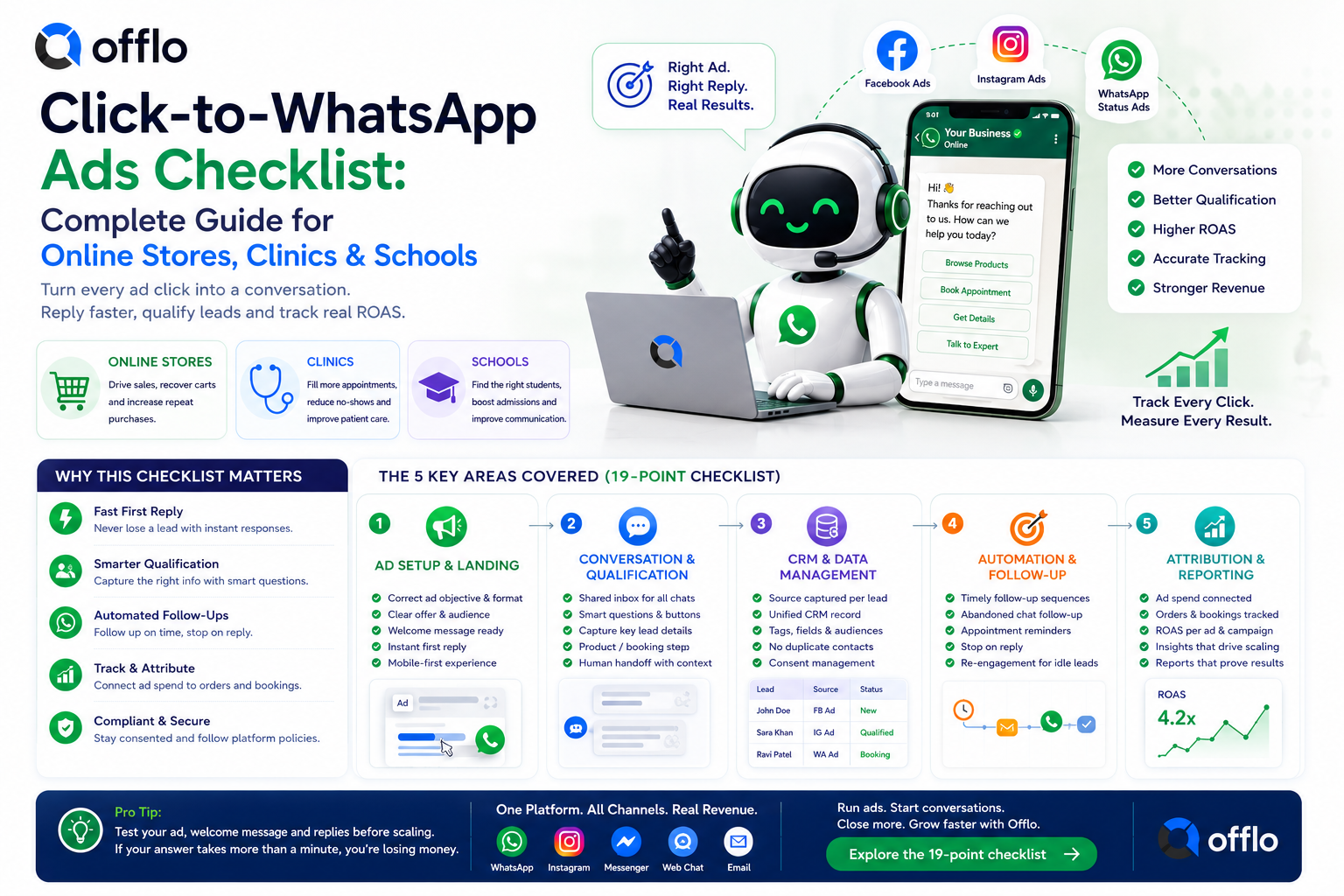
A Click-to-WhatsApp ads checklist is a standardized list of 19 checks that every online store, clinic and school should pass before spending on Meta ads that open a WhatsApp chat. It covers ad setup, instant replies, lead qualification, CRM tracking and revenue attribution, and it can be completed in-house or with an AI revenue platform like Offlo.
If you run ads, the biggest barrier between you and a profitable campaign is not the creative, it is what happens after the click. A slow reply, a lost source or an untracked order makes it impossible to know what your spend actually earned. Pass the checklist and every click gets an answer, a record and a measurable result.
This guide gives you the complete ads and attribution checklist, a plan for each industry, a breakdown of what to prepare, and every option for getting started, including how to connect ad spend to real orders with offlo.ai.
What is a Click-to-WhatsApp ads review?
A Click-to-WhatsApp ads review is a readiness check that confirms your ads, first replies, lead capture and tracking work together before you scale spend. It covers everything from the ad destination and welcome message to qualification, follow-up and per-ad return on ad spend (ROAS).
Online stores, clinics and schools run this review before launching campaigns, then repeat it whenever they change an offer, a branch or a creative. The results are recorded on a simple ads plan signed off by whoever owns marketing, and supported by tools such as Offlo marketing and the Offlo AI Agent.
Key facts about Click-to-WhatsApp ad reviews:
• Recommended before any business increases spend on ads that open a chat
• Worth repeating whenever you launch a new offer, audience or creative
• Covers 19 standardized checkpoint areas
• Can be completed in-house or with an all-in-one platform like offlo.ai
• Related formats include Click-to-Website and WhatsApp Status ads, which follow the same tracking principles
The complete Click-to-WhatsApp ads and attribution checklist
Whether you sell on Shopify, fill clinic appointments or recruit students, the core ads checklist is nearly identical. Here is every item your team should evaluate, grouped by category.
Ad setup and landing checks
|
Checklist item |
What to look for |
Common fail reasons |
|
Business accounts linked |
Meta ad account, page and WhatsApp number connected |
Ads pointing at a number nobody monitors |
|
Ad destination |
Click-to-WhatsApp, Click-to-Website or Status ad chosen on purpose |
Wrong format for the offer |
|
Audience |
Clear target based on past customers or enquiries |
Broad audience, wasted spend |
|
Offer clarity |
One offer, price or service per ad |
Vague promise, mixed messages |
|
Creative and copy |
Message matches the product, treatment or programme |
Ad and chat tell different stories |
|
Welcome message |
Pre-filled opener that starts a useful chat |
Blank chat, customer unsure what to say |
|
Instant first reply |
Answer arrives in seconds, even out of hours |
Replies the next morning, lost click |
|
Approved knowledge |
AI answers only from content you have approved |
Wrong prices, outdated offers |
|
Landing path |
Chat or page works on mobile first |
Slow page, broken link |
|
Budget and schedule |
Spend matched to team availability |
Ads running while nobody can reply |
Conversation and qualification checks
|
Checklist item |
What to look for |
Common fail reasons |
|
Shared inbox |
Ad chats land in one omnichannel inbox |
Leads scattered across phones |
|
Structured qualification |
Buttons and lists capture need, budget, intake or preferred time |
Long free-text back-and-forth |
|
Product or booking step |
Customer can choose a product, book a slot or ask for a counsellor |
Chat ends without a next step |
|
Human handoff |
Full conversation passed to staff with context |
Customer repeats everything |
|
Follow-up sequences |
Reminders for unanswered or abandoned chats, stopping on reply |
Hot leads never chased |
CRM and attribution checks
|
Checklist item |
What to look for |
Common fail reasons |
|
Source captured |
Every contact tagged with the ad that started the chat |
Unknown lead source |
|
Unified CRM record |
One profile with messages, fields and audiences |
Duplicate contacts, lost history |
|
Orders joined to ads |
Purchases, bookings or enrolments linked to the original ad |
Spend and revenue in separate systems |
|
ROAS per ad |
Return measured ad by ad, not just per campaign |
Scaling ads that look good but do not sell |
Pro tip: The single most common reason ad budgets disappear is a slow first reply. Test your ad yourself, send the welcome message from a personal phone, and time how long the answer takes. If it is more than a minute, fix that before you raise spend.
Online store ads plan: What you need
The online store ads plan is a one-page document your team fills out after running through the 19-point checklist above. Without it, there is no clear record of which ads are live, who answers the chats and how revenue is tracked.
How to get the online store ads plan
You have three ways to build and complete your plan:
1. Build it in a spreadsheet. Copy the 19 items above into a sheet and mark each pass or fail. This works well for small Shopify stores.
2. Get it from an ads agency. Many performance marketing agencies run a post-click audit during onboarding. Ask for it by name.
3. Complete it with Offlo. The Offlo ecommerce platform lets you create Click-to-WhatsApp, Click-to-Website and WhatsApp Status ads, then joins spend to purchases so you can see ROAS per ad. Its AI agent replies with your store in view, handling product discovery, cart recovery and order support.
What the online store ads plan includes
A standard plan asks for:
• Store information: Store name, platform (such as Shopify), WhatsApp number, ad accounts connected
• Owner information: Name, role and the person who answers ad chats
• 19-point checklist: Pass or fail for each item above
• Approval note: Confirmation that offers, prices and templates are current
• Date: Review again whenever you launch a new offer or creative
Once your plan is complete, launch one campaign and review results before scaling. You can book a demo for a walkthrough or compare pricing first.
Clinic and school ads plans: Requirements by industry
The clinic and school ads plans use the same 19-point checklist as the online store plan, but each has its own focus. Most of the setup carries over, so if you run more than one type of business you usually build the foundation only once.
How to get the clinic ads plan
Clinics, dental practices and wellness centers can complete the plan through:
• An internal review. The practice manager walks through the 19 checks and records the result.
• A marketing or compliance lead. Many groups already have someone who signs off patient-facing ads and messages.
• Online with Offlo. The Offlo healthcare platform answers ad enquiries instantly on WhatsApp, Instagram, Messenger and web chat, captures the service, branch and preferred time, and sends reminders. Replies come only from approved service lists, price ranges and policies, and clinical questions go to staff.
How to get the school ads plan
Schools, colleges, universities, academies and coaching centers can complete theirs through:
• An admissions team review. Counsellors confirm programmed, fee and intake details are current before ads go live.
• A lead pipeline audit. Check that every ad enquiry becomes a record with a stage and an owner.
• Online with Offlo. The Offlo education platform works as an AI admissions assistant and CRM. It qualifies each enquiry with WhatsApp buttons and lists, then hands the full conversation to a counsellor.
Can one ads setup serve every industry?
Yes, in most cases. The 19-point checklist is standardized, so your ad accounts, inbox, CRM and tracking can be reused across stores, clinics and schools. There are a few exceptions, though:
• Healthcare: Ads and replies must stay non-clinical. The AI must not diagnose, prescribe or handle symptoms, medication or test results.
• Education: Fee, intake and deadline claims in ads must match approved programmed content.
• Ecommerce: Offers, stock and prices must stay in sync with your store, so ads never promise what is unavailable.
When in doubt, start with the shared checklist and add industry checks afterwards. The Offlo FAQ or the contact page can point you to the right setup.
Final thoughts
The click is only the start. Profitable ads need a fast reply, a clear next step and a record that links every chat to the revenue it produced. Check your setup, track every source and keep humans in the loop for anything sensitive.
If you want ads, conversations, CRM and orders connected in one workspace, offlo.ai brings the AI agent, inbox, automation and marketing together. Explore the setups for ecommerce, healthcare and education, or book a demo to see it with your own channels.

 English
 French
 Spanish
 Portuguese
 Deutsch
 Turkish
 Dutch
Dutch
 Italiano
 Russian
 Romaian
 Portuguese (Brazil)
 Greek
Greek