


3D Printing in Schools and Colleges: Setting Up a Lab That Students Actually Use
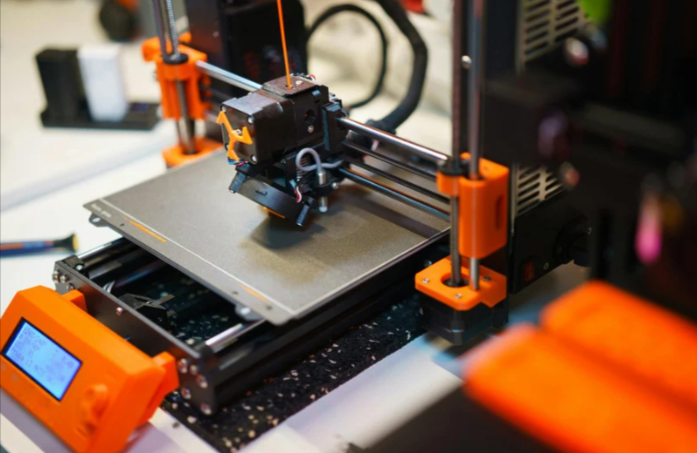
Plenty of institutions buy a printer, put it in a cupboard and discover six months later that nobody touches it. The machine wasn't the problem. Nobody planned who would run it, what students would make, or how consumables would be paid for. An Elegoo 3D printer or any other model will only earn its place if the lab around it is designed with teaching in mind.
This guide is for principals, department heads, lab coordinators and makerspace managers. It covers choosing machines, planning a syllabus, running safe sessions, handling materials and budgeting for a year, so your lab is busy for the right reasons. Prices come from Hydrotech 3D Chennai's published listings at the time of writing, taxes included. Confirm current prices before you submit any purchase proposal.
Start With Learning Goals, Not Hardware
Before comparing models, answer three questions in writing.
- Who will use the lab? Middle school students, engineering undergraduates, design students or faculty researchers need very different things.
- What should they be able to do after a term? Design a part, test a prototype, create a project for an exhibition, or run a small production job.
- Who owns the lab day to day? A named person, not "the department".
Once those are clear, the equipment list almost writes itself.
| Setting | Typical goal | Suggested focus |
|---|---|---|
| School (grades 6 to 10) | Spark curiosity, teach design thinking | Simple, safe filament printers, short projects |
| Senior school and junior college | Link physics and design to real objects | Filament printers plus basic CAD |
| Engineering college | Prototyping, project work, research | Several filament machines, possibly one resin |
| Design or architecture college | Models and presentation pieces | Filament for scale models, resin for fine detail |
| Makerspace or incubator | Open access for members | Variety, including multi-function machines |
Picking Machines for Teaching
A classroom printer has to survive many hands, so ease of use and support matter more than raw speed. Hydrotech describes the Neptune series as offering excellent value for beginners and intermediate users who want reliability without complexity, and it lists the following models.
| Model | Type | Listed price | Teaching fit |
|---|---|---|---|
| Neptune 4 | Filament | ₹24,000 | Entry-level, good for first labs |
| Neptune 4 Pro | Filament | ₹28,000 | Step up for senior classes |
| Neptune 4 Plus | Filament | ₹32,000 | Larger bed for bigger projects |
| Centauri Carbon | Filament | ₹38,500 | Enclosed-style, helpful where drafts or curious hands are a concern |
| Mars 5 Ultra | Resin | ₹32,000 | Small detailed models for design courses |
| Saturn 4 | Resin | ₹45,000 | Batch printing for advanced groups |
Explore the whole range on the Elegoo category page. For makerspaces and technical labs that want to combine printing with laser engraving and CNC work, Hydrotech's site also lists Snapmaker's modular range, which it describes as bridging 3D printing, laser engraving and CNC in one platform.
A practical rule: buy several modest machines rather than one expensive one. Students then print in parallel, a single failure doesn't stop the whole lab, and group projects don't queue for days.
How Many Printers Does a Lab Need?
There's no single answer, but you can estimate.
| Class size | Printing pattern | Machines to consider |
|---|---|---|
| Up to 30 students, one section | Teams of 4 to 5, occasional printing | 2 to 3 machines |
| 60 students, project-heavy term | Frequent printing in peak weeks | 4 to 6 machines |
| Open makerspace with walk-in users | Unpredictable demand | 4 or more, with booking system |
| Research group | Few but long prints | 1 to 2 reliable machines |
Remember that prints take hours. Plan slots, not simply machine counts. A good lab keeps a simple booking sheet and a queue.
Understanding 3D Printer Filament for Institutional Use
Consumables decide whether a lab stays active. A lab without materials is just furniture, so it's worth understanding 3D printer Filament as a budget line, not an afterthought.
For teaching, simpler is better.
| Material | Why labs like it | Cautions |
|---|---|---|
| PLA | Easy to print, low odour, wide colour range, forgiving | Softens in heat, not for outdoor or high-load parts |
| PETG | Tougher than PLA, good for functional projects | Can string, needs a little tuning |
| TPU | Teaches flexible design | Slower and fussier, for advanced students |
| ABS and similar | Strong, heat resistant | Fumes and warping, better kept to enclosed machines and ventilated rooms |
Most school labs can run almost entirely on PLA, with PETG added for engineering classes. Hydrotech's filament section lists materials from Bambu Lab, Elegoo and Anycubic, so compare options and keep a short approved list for the lab.
Practical handling tips:
- Store spools sealed with desiccant, since Chennai's humidity affects print quality.
- Label every spool with material and date.
- Assign a student or teaching assistant to inventory each week.
- Standardise on a few colours to avoid waste.
Designing a Simple Curriculum
A printer is easier to justify when it sits inside a syllabus. Here's a sample progression for a college term. Adjust it for school levels.
| Week | Topic | Student output |
|---|---|---|
| 1 | Safety, how printers work, slicer basics | Print a ready-made calibration object |
| 2 | Introduction to CAD | Design a simple keychain or name tag |
| 3 | Tolerances and fit | Print two parts that fit together |
| 4 | Orientation, supports, strength | Compare a part printed in two orientations |
| 5 | Design for a purpose | A phone stand, organiser or tool holder |
| 6 | Iteration | Redesign a failed or weak part |
| 7 | Team project planning | Concept, sketches, bill of materials |
| 8 to 10 | Project build | Prototype with test results |
| 11 | Finishing | Sanding, painting, assembly |
| 12 | Exhibition and review | Presentation and reflection |
Projects that connect to real needs, such as a low-cost assistive device, a campus signboard or a model for another department, motivate students far more than abstract exercises.
Safety Rules Every Lab Should Write Down
Safety isn't only about resin. Filament printers have hot nozzles and heated beds, and moving parts can pinch fingers. Create a short laminated sheet near each machine.
- No unsupervised use for younger students.
- Never touch the nozzle or bed while heated.
- Keep loose sleeves, hair and cables clear of moving parts.
- Ventilate the room, especially when printing materials that emit fumes.
- Know the power-off point and keep a fire extinguisher accessible.
- Don't leave long prints running overnight unless the institution's policy allows it and someone is responsible.
- Report any damage or burnt smell immediately.
If you add resin machines, they need gloves, eye protection, proper ventilation, isolated cleaning areas and a waste-disposal procedure, and they're usually better reserved for older students under direct supervision. Always follow each resin's safety data sheet. Our resin printing guide covers the workflow. Swap that link for the live Blog 3 URL once published.
Budgeting for the Year
Many labs underestimate recurring costs, so plan beyond the purchase order.
| Cost item | Notes |
|---|---|
| Printers | One-time, using listed prices as a guide |
| Materials | Largest recurring cost, scales with student numbers |
| Spare parts | Nozzles, build plates, belts, fans |
| Tools | Scrapers, cutters, sandpaper, calipers |
| Furniture and power | Sturdy tables, extension boards, surge protection |
| Safety equipment | Gloves, eye protection, extinguisher |
| Software | Many slicers and CAD tools are free, but check licences for advanced use |
| Training | Staff and student orientation |
| Contingency | For repairs and replacements |
As a general planning habit, keep a contingency of 10 to 20 percent of the equipment budget. This is a rule of thumb and not an official figure, so adjust for your institution.
Managing the Lab Day to Day
A working lab needs systems, not just machines.
- A lab manager or coordinator who owns upkeep and permissions.
- Student lab assistants who are trained to help others and rewarded with credit or recognition.
- A booking sheet showing printer slots.
- A file-submission rule, such as accepting only checked models.
- A materials log showing who used how much.
- A fault register so that repeated problems are spotted early.
- Weekly maintenance such as cleaning the bed, checking nozzles and updating firmware.
A student who learns to fix a clogged nozzle has learned something valuable, which is part of the point.
Ways to Keep Students Engaged
- Run themed challenges, such as "design a bracket that holds a set weight".
- Hold an exhibition at the end of every term.
- Invite local engineers or designers to give feedback.
- Link projects to other subjects: physics demonstrations, biology models, history artefacts, geography relief maps.
- Publish a gallery on the institution's website or notice board.
- Partner with local businesses for real briefs.
Engagement tends to rise when the output is displayed, used or sold, not simply graded.
Buying Through a Supplier Who Understands Education
Institutions have specific needs: quotations, invoices, warranty documentation, demonstrations and staff training. Hydrotech 3D Chennai says it has served educators, among other customer groups, since 2020, sources from official brand channels and offers support by phone, WhatsApp and in person at its Valasaravakkam store. Whoever you choose, ask for a written quotation, a clear warranty process in India, a spares plan and whether a demonstration or short orientation is available before purchase.
For pricing context, see our cost guide. Swap that for the live Blog 2 URL once published.
Final Thoughts
A good 3D printing lab is built around people and projects, not hardware. Define learning goals, buy several dependable machines, standardise a small set of materials, write safety rules, plan a syllabus and budget for consumables. Then give students real problems to solve.
To compare current models, visit the Elegoo range, call +91-9445390912 or visit the store in Valasaravakkam, Chennai.
Frequently Asked Questions
1. How many printers does a school lab need?
Two to three machines can serve a single class section. Larger groups or open makerspaces benefit from four or more.
2. Which filament is best for classrooms?
PLA is the usual choice because it is easy to print and low in odour. PETG suits tougher engineering projects.
3. Are 3D printers safe for students?
With supervision and rules, yes. Hot nozzles, heated beds and moving parts need basic safety training.
4. Should a school buy resin printers?
Only if you can provide ventilation, gloves, eye protection and supervised use. Many schools start with filament.
5. How do we budget for materials?
Estimate student numbers and print sizes, then add a contingency. Recurring costs often exceed what institutions expect.
6. Can one printer serve a whole class?
For short demos, yes, but project work usually needs several machines to avoid long queues.
7. Does the supplier offer demonstrations?
Hydrotech says you can visit its store for walkthroughs and sample prints, and you can ask about institutional requirements directly.

 English
 Arabic
 French
 Spanish
 Portuguese
 Deutsch
 Dutch
 Italiano
 Russian
 Romaian
 Portuguese (Brazil)
 Greek