


Paper vs Digital Cannabis Menus Which Is Best for Your Dispensary?
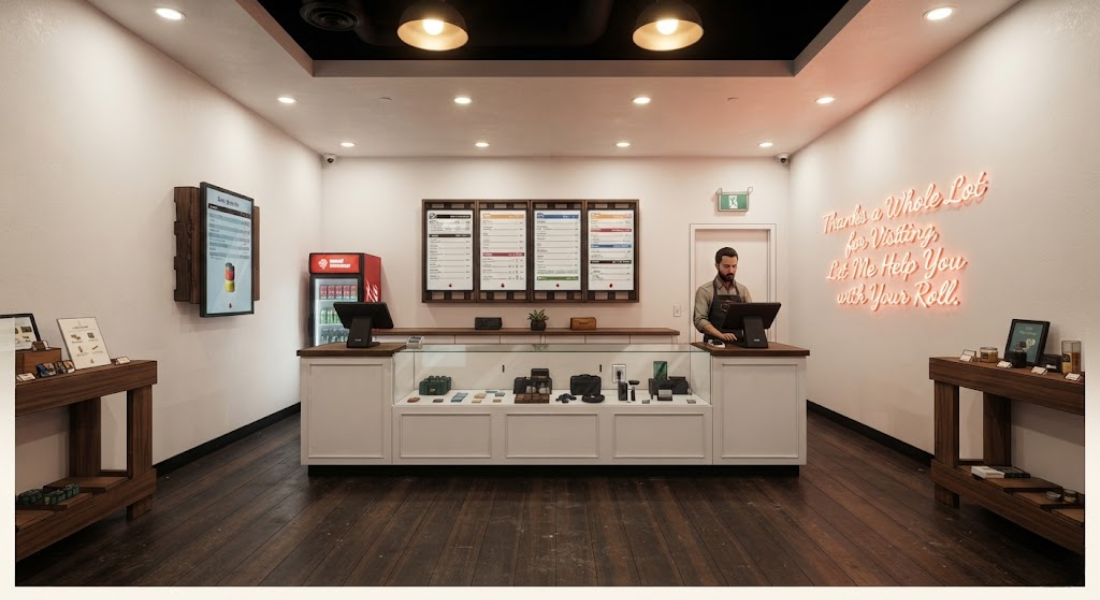
Step inside any cannabis dispensary and you might encounter wall-sized screens, printed cards on countertops, or both.
Dispensaries often use digital displays and printed materials together to offer customers multiple ways of browsing products. However, these options can also spark a bigger question for retailers.
Should dispensaries use printed materials, digital cannabis menus, or both?
The answer depends on how your store operates, how frequently your inventory rotates, and how customers like to browse. Cannabis retailers can look past false digital vs. paper conflicts by understanding the strengths of each format.
What Are Digital Cannabis Menus?
Digital cannabis menus are menu boards that show dispensary products and information on electronic displays.
Digital displays range from single screens to walls of coordinated menu boards. One benefit of digital displays is their flexibility. Cannabis menu software can store information digitally, eliminating the need to redesign and reprint materials for every menu change.
Digital displays are helpful for dispensaries with rapidly rotating inventory. They can also help retailers organize products by category, creating clearer browsing paths for customers.
BudSense is one example of a platform associated with digital and print menu solutions for cannabis retailers.
When to Use Digital Menus
Digital displays can offer additional merchandising space for dispensaries with large inventories. Rather than printing one large sheet, cannabis retailers can layer multiple screens or use rotating board setups to separate categories.
Screens can also contribute to your store’s visual design. A cohesive menu supports your brand with typography, imagery, layout, and product organization.
Still, technology should address an existing pain point. Before investing in digital displays, retailers should research the features offered by menu platforms.
Questions to ask cannabis menu software providers include integrations, editing restrictions, screen limits, support, and pricing. These details can help you decide if a solution meets your business’s needs.
For retailers exploring these options, BudSense provides resources covering different approaches to cannabis menu presentation and management.
Why Paper Cannabis Menus Are Still Useful
As tempting as it can be to jump on the latest trends, don’t discount printed materials.
Paper cannabis menus are familiar. Your customers can grab a menu, read it away from a screen, and hold a card up while discussing related products with your staff.
Printed menus also work well in high-information areas. You may choose to display printed product cards next to a larger digital display, providing customers with more details about each product.
Menus and printed cards can move around your store without requiring hardware or cords. This ease of movement comes at the cost of flexibility. Updating printed materials can require your staff to physically edit or reprint them.
BudSense also highlights the usefulness of printed menu formats alongside digital options.
Your Hybrid Solution
The solution isn’t always digital or physical. Some dispensaries use digital displays and printed materials together.
Hybrid menu solutions can dedicate different tasks to digital and printed formats. Electronic dispensary menus can power your main display, while printed materials can highlight certain products, provide supplemental information, or offer alternate browsing options.
Hybrid menus can help you make the most of your physical space. By balancing digital displays with printed materials, you ensure that your screens can remain focused and easy to read.
Browse the original BudSense guide to cannabis dispensary menu options to see digital and printed formats in action.
Streamlining Menu Updates with POS Integration
Consider how your menu system will integrate with your existing technology.
Cannabis menus with POS integration can connect with your existing software to streamline menu management. Integrations can limit duplicate data entry and simplify maintenance.
When researching cannabis menu software, retailers should consider how often information synchronizes, who can edit menu items, and whether the software provides direct control over menu appearance.
A beautiful menu solution that requires excessive management from your team can create more problems than it solves.
Retailers comparing menu platforms can also review resources from BudSense to better understand digital and print menu approaches.
5 Cannabis Menu Features to Compare
Deciding on a menu system? Compare cannabis dispensaries on these features:
1. Update Process
Consider how easy or difficult it is to update product information when inventory rotates.
2. Display Options
Cannabis retailers should look for menu software that lets them organize how products are displayed. Don’t limit your store to a one-size-fits-all display.
3. POS Integration
Menus that integrate with your existing POS or inventory management tools can streamline certain tasks.
4. Available Space
How many screens, countertop displays, and print copies can your store support? While menu software can be scalable, your store may not be.
5. Customer Needs
Every store is different. Do your customers prefer to browse screens, hold printed menus, or use both?
Help these questions guide you toward a menu that complements your store’s workflow, rather than adopting industry trends that don’t fit your team.
BudSense offers another example of how retailers can consider digital and printed formats when building their menu strategy.
Conclusion
Printed menus and digital displays are not mutually exclusive. Digital cannabis menus can help you showcase your brand and adapt to inventory changes. Paper cannabis menus give customers something tangible to read and share with your staff.
Many dispensaries will find success with a menu that features both digital displays and printed materials. Consider your inventory, store layout, customer preferences, POS integration, and menu maintenance when building your menu system.
By providing customers with efficient access to product information, you’ll make their lives easier. And when your customers are happy, your staff will be too.
For retailers looking for additional information about cannabis menu strategies, BudSense can be explored as a resource for digital, print, and hybrid menu solutions.
FAQs About Digital and Paper Cannabis Menus
1. What Are Digital Cannabis Menus Used For?
Digital cannabis menus display products and related information on screens within your dispensary.
2. Are Paper Cannabis Menus Outdated?
No. Paper cannabis menus are great for providing customers with physical materials. Printed cards can also be a helpful supplement to your main product displays.
3. What Are Digital Dispensary Menus?
Digital dispensary menus are electronic product menus. These menus are commonly displayed on TVs and other digital screens.
4. Why Is POS Integration Important?
Menus with POS integration can limit duplicate work for your staff and make it easier to manage connected systems.
5. Can Dispensaries Use Digital and Paper Menus?
Absolutely. There’s no rule that says dispensaries must choose between digital or printed menus. Many dispensaries use a combination of both to achieve their desired setup.

 English
 French
 Spanish
 Portuguese
 Deutsch
 Turkish
 Dutch
Dutch
 Italiano
 Russian
 Romaian
 Portuguese (Brazil)
 Greek
Greek