


IPTV EPG Explained: How Program Guides Improve Everyday Streaming
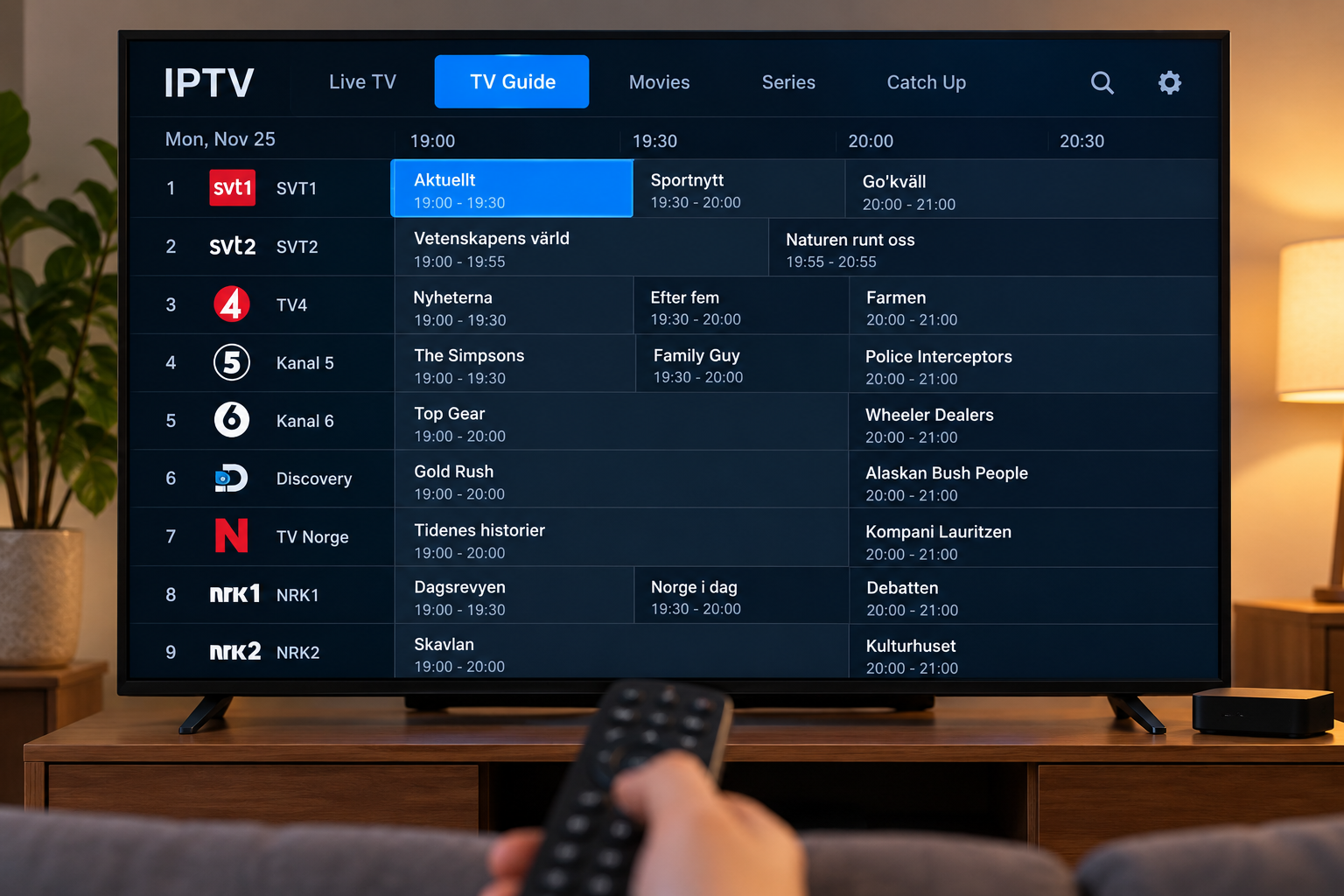
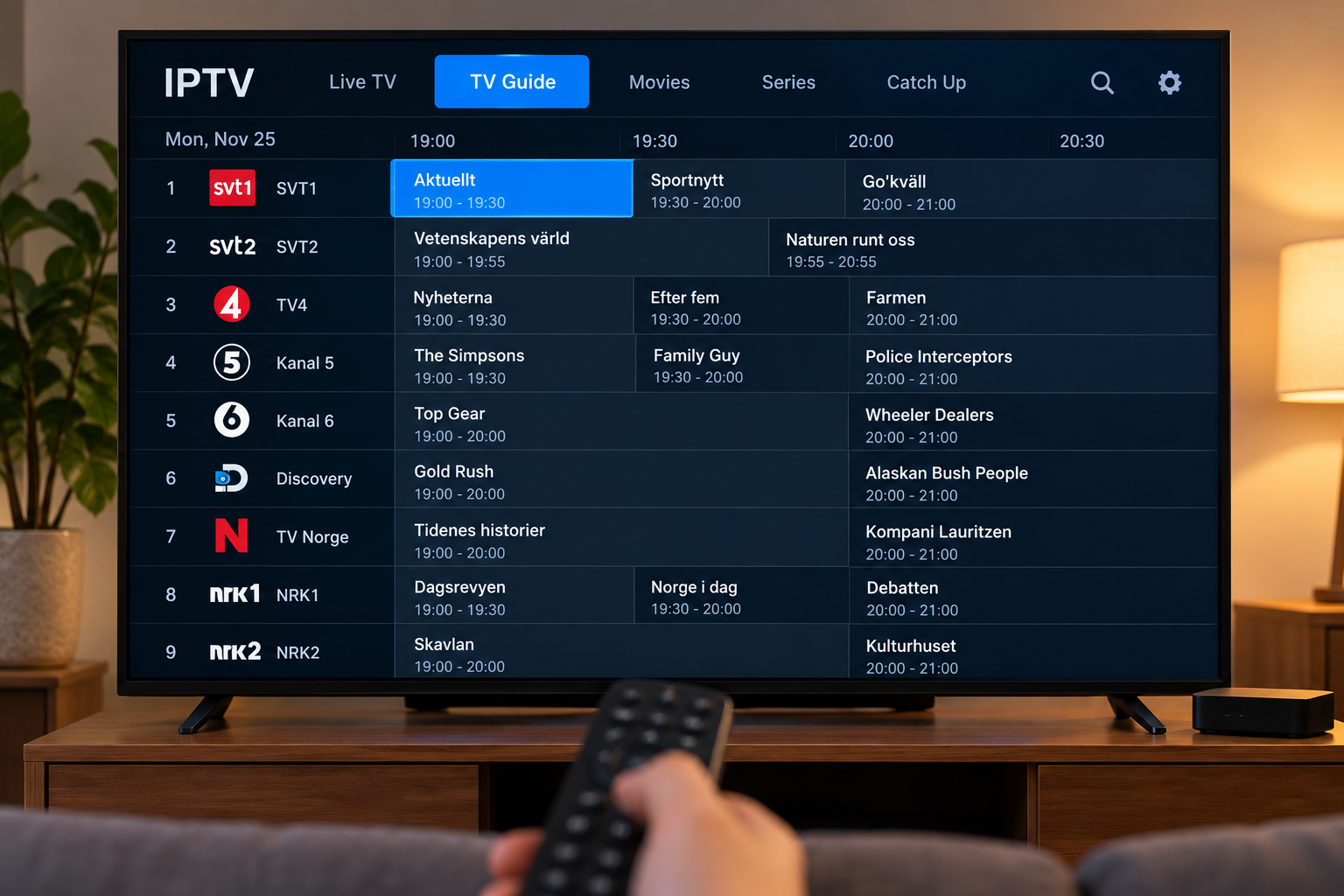
Finding something to watch should not require opening channels one by one. This is where an Electronic Program Guide, commonly called an EPG, becomes useful for IPTV viewers.
An EPG organizes television schedules into a familiar guide that can show what is currently playing, what starts next, and what may be available later in the day. When properly configured, it can make a large IPTV channel list much easier to navigate.
Understanding how EPG data works can also help users troubleshoot missing schedules and choose a suitable IPTV player.
What Is an IPTV EPG?
EPG stands for Electronic Program Guide. It is a digital schedule that displays programming information inside a compatible IPTV application.
A typical guide places channels in rows and scheduled programs along a timeline.
Depending on the available data, viewers may see:
-
Program titles
-
Start and end times
-
Channel names
-
Upcoming programs
-
Program descriptions
-
Categories
-
Current program progress
The amount of information shown depends on the EPG source and the features supported by the IPTV player.
How Does an EPG Work With IPTV?
The IPTV stream and the program guide are separate components.
The stream delivers the actual television content, while EPG data supplies information about scheduled programming.
An IPTV application combines these two elements so viewers can select a channel while seeing relevant schedule information.
Some services automatically connect EPG data to channels. Other setups may require additional configuration inside the player.
Why an EPG Makes IPTV Easier to Use
Large IPTV channel lists can become difficult to navigate without organization.
Instead of remembering channel schedules, users can open the guide and quickly see what is currently being broadcast.
Faster Channel Selection
A program guide allows viewers to browse programming before opening a stream.
This can be particularly useful when several sports events, news programs, movies, or entertainment shows are available at the same time.
Better Planning
An EPG can help viewers check what is coming later.
Someone interested in a particular program can look through upcoming schedule information rather than repeatedly checking the channel.
Easier Navigation
Program names provide more context than channel names alone.
For households with many available channels, this can significantly improve everyday navigation.
Important EPG Features to Look For
Not every IPTV player handles program guides in the same way.
When choosing an application, several features may improve usability.
Timeline View
A timeline presents channels and programs in a traditional television guide format.
This makes it easy to compare several channels at the same time.
Current Program Indicator
Some players visually show how much of the current program has already finished.
This helps viewers decide whether they want to start watching immediately or wait for the next program.
Search Function
A search tool can be valuable when users want to locate a specific program, channel, or category.
Favorites
Combining an EPG with a favorites list allows users to focus on the channels they watch most frequently.
This prevents unnecessary scrolling through large channel collections.
Why EPG Information Sometimes Goes Missing
A missing program guide does not necessarily mean that IPTV itself has stopped working.
Several factors can affect EPG information.
Data Has Not Refreshed
Some applications periodically download updated schedule information.
If the guide appears outdated, refreshing the EPG data inside the application may solve the problem.
Incorrect Time Settings
Incorrect device time or timezone settings can cause programs to appear at the wrong hour.
Checking the television or streaming device's date and timezone settings is a useful troubleshooting step.
Channel Matching Problems
The player must correctly associate EPG information with the appropriate channel.
If channel names or identifiers do not match properly, some schedules may remain blank even though other channels display information correctly.
Temporary Data Availability
Program schedule information may occasionally be incomplete or temporarily unavailable.
Testing several channels can help determine whether the issue affects the entire guide or only specific entries.
EPG on Smart TVs
Many IPTV players designed for Smart TVs support electronic program guides.
The exact interface varies depending on the application and television platform.
Samsung, LG, Android TV, and Google TV devices may offer different player options, so users should confirm that their preferred IPTV application includes EPG functionality before installing it.
Older Smart TVs may also display large program guides more slowly because of limited processing power or memory.
EPG on Streaming Boxes
Dedicated streaming devices often provide a flexible environment for IPTV applications.
Android TV boxes and similar devices can support players with advanced guide features, including:
-
Custom channel groups
-
Favorites
-
Program search
-
Multiple playlists
-
Different EPG layouts
The available features depend on the application rather than the hardware alone.
A capable streaming box can nevertheless make navigating a large guide feel faster than using older television software.
Organize Channels Before Using the Guide
An EPG becomes more useful when the underlying channel list is organized.
Users can start by creating favorites for the channels they actually watch.
Channels may also be grouped into categories such as:
-
Sports
-
News
-
Movies
-
Entertainment
-
Children's programming
-
International television
Reducing unnecessary clutter makes both the channel list and program guide easier to browse.
Choosing IPTV for Nordic Viewing
Viewers in Sweden and other Nordic countries may want quick access to Scandinavian entertainment, sports, news, movies, and international programming.
A well-organized EPG can make navigating these categories significantly easier.
People researching IPTV options for Nordic viewing can include VIKING IPTV in their comparison while considering device compatibility, available setup information, content preferences, and the features they want from their IPTV player.
Keep Your IPTV Application Updated
Application updates can affect how well program guides load and display.
Users should periodically check for updates to their:
-
IPTV player
-
Smart TV software
-
Streaming device
-
Operating system
Updates may improve compatibility, navigation, and general application stability.
Restarting the player after an update can also help ensure new settings are properly applied.
EPG and Internet Performance
EPG data itself normally requires much less bandwidth than streaming television.
However, an unstable internet connection can still prevent schedule information from downloading correctly.
If both channel playback and EPG loading are experiencing problems, checking the network connection is a sensible first step.
If streams work normally but the guide remains empty, the issue may instead involve EPG configuration or schedule data.
Do You Need an EPG to Watch IPTV?
An EPG is useful, but it is not always required for basic playback.
Channels can still be selected from a list when program guide information is unavailable.
The difference is mainly convenience.
Without an EPG, users know which channel they are opening but may not know what program is currently playing. With a properly configured guide, that information can appear directly beside the channel.
Final Thoughts
An Electronic Program Guide can turn a basic IPTV channel list into a much more organized television experience.
It allows viewers to see current programs, browse upcoming schedules, find channels faster, and plan what they want to watch.
The best results come from combining accurate EPG data with a compatible IPTV player, properly configured device, organized channel list, and stable internet connection.
For viewers who regularly watch live television, learning how to use and maintain an IPTV EPG can make everyday streaming considerably easier.

 English
 French
 Spanish
 Portuguese
 Deutsch
 Turkish
 Dutch
Dutch
 Italiano
 Russian
 Romaian
 Portuguese (Brazil)
 Greek
Greek