


How to Use Fiber Optic Tools for Cable Preparation, Installation, and Testing
Fiber optic cables play an important role in modern communication networks. They support high speed internet, telecommunications, data centers, and broadband connections. However, installing and maintaining these cables requires the right tools and careful handling. Even a small mistake during cable preparation or connector cleaning can affect signal performance.
For technicians and installers, understanding how to use fiber optic tools correctly can make everyday work easier and help prevent avoidable cable damage. From stripping the cable jacket to inspecting connectors and testing signal quality, each step requires a suitable tool and the right technique.
In this guide, we explain how to select and use fiber optic cable tools for common installation and maintenance tasks.
Step 1: Choose the Right Fiber Optic Tools for Your Job
Before starting an installation, identify the type of fiber optic cable and the work you need to complete. Different cables have different jacket sizes, coatings, and internal structures, so one tool may not suit every application.
A basic set of fiber tools may include:
-
Fiber optic strippers: Remove protective coatings from optical fibers.
-
Cable slitters and mid-span tools: Open cable jackets or access internal fibers.
-
Fiber cleavers: Create a clean, controlled fiber end for splicing.
-
Connector cleaners: Remove dust and contamination from connector end faces.
-
Inspection tools: Help technicians examine fiber ends and connector surfaces.
-
Testing equipment: Measures optical power or helps identify faults in a fiber link.
For example, technicians working on fiber to the home (FTTH) installations may need cable preparation tools, connector cleaning equipment, and optical testing devices. Field technicians maintaining outdoor fiber networks may also need specialized slitting tools and duct cutters.
Choosing the right equipment for the cable type and task helps reduce unnecessary handling and improves preparation consistency.
Step 2: Prepare the Work Area and Inspect the Cable
Before using any tool, organize your workspace and inspect the cable for visible damage. Check the manufacturer's instructions to identify the correct stripping dimensions, tool settings, and preparation procedure.
Keep the work area clean because dust, dirt, and other contaminants can affect fiber connections. Make sure your tools are clean, undamaged, and suitable for the cable you are handling.
Fiber fragments can be extremely small and may cause injury. Wear appropriate eye protection, follow workplace safety procedures, and collect fiber scraps in a designated, secure disposal container. Never touch or brush away exposed fiber fragments with bare hands.
Also, never look directly into a fiber connector or cable end. Use a suitable inspection device and follow the required safety procedures before inspecting or testing a fiber link.
Step 3: Strip the Cable Carefully
Cable stripping is an important part of fiber preparation. The goal is to remove the required protective layers without damaging the optical fiber or the components underneath.
Follow these steps:
-
Identify the cable construction and determine which layer needs to be removed.
-
Select a compatible cable stripper or fiber optic stripping tool.
-
Adjust the tool if required, following its operating instructions.
-
Position the cable correctly and apply the tool according to the manufacturer's directions.
-
Remove the designated jacket or coating carefully.
-
Inspect the exposed section for signs of damage before continuing.
Some fiber optic cables contain outer jackets, strength members, buffer tubes, and coated fibers. Each layer requires an appropriate preparation method.
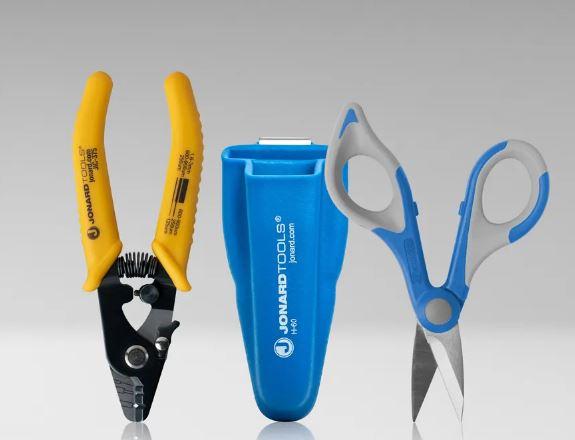
For instance, a three hole fiber stripper such as Jonard's JIC-375 is designed for specific coating sizes, including 250 µm, 900 µm, and 3 mm cable preparation applications. Always confirm that the tool matches the actual cable and coating dimensions.
Avoid excessive force when stripping. Damaging the glass fiber can lead to breakage or poor connection performance.
Step 4: Open the Cable Jacket When Access Is Needed
Some installation and maintenance tasks require access to fibers inside an existing cable without cutting the entire cable.
In these situations, a suitable slit and ring tool or mid-span slitter can help open the cable jacket or access designated internal sections. These tools are commonly used in outdoor plant maintenance, distribution networks, and certain fiber access applications.
To perform this task safely:
-
Confirm the cable diameter and construction before selecting a tool.
-
Choose a tool designed for the specific jacket or cable type.
-
Follow the manufacturer's instructions for blade positioning and cutting depth.
-
Work carefully to avoid contacting internal fibers or buffer tubes.
-
Inspect the exposed section before proceeding with the installation.
Do not assume that a tool designed for one cable diameter will work safely on another. Correct tool selection is particularly important when working with thick walled jackets or specialized fiber cables.
Step 5: Cleave or Prepare the Fiber for Splicing
When preparing optical fiber for fusion splicing, a clean and controlled fiber end is essential. A fiber cleaver helps create the end face required for the splicing process.
Start by preparing the fiber according to the splicer's requirements. Remove the necessary coating, clean the exposed fiber using an approved method, and position it correctly in the cleaver.
Operate the cleaver according to its instructions. Avoid touching the prepared fiber end or allowing it to contact dirty surfaces.
After cleaving, inspect the fiber end if your workflow requires it. An uneven or damaged cleave can affect splice quality, so repeat the preparation process when the result does not meet the equipment manufacturer's requirements.
Dispose of the resulting glass fragments safely. Never leave cleaved fibers on the workbench or floor.
Step 6: Clean Fiber Connectors Before Connecting Them
Connector contamination is a common cause of fiber connection problems. Dust, oil, and other particles on a connector end face can increase signal loss or interfere with reliable transmission.
Cleaning should be part of the normal connection process, not just a troubleshooting step.
Here's how to approach connector cleaning:
-
Inspect the connector using a suitable fiber inspection microscope.
-
If contamination is present, use a compatible connector cleaner or approved cleaning materials.
-
Follow the cleaning tool's instructions and use the correct method for the connector type.
-
Inspect the connector again after cleaning.
-
Repeat the process if contamination remains.
-
Keep the connector protected with a clean dust cap until it is ready to be connected.
Jonard offers connector cleaning tools for different ferrule sizes and applications. Selecting the appropriate cleaner helps technicians maintain a consistent cleaning process across different types of fiber connections.
Remember that cleaning a connector once does not guarantee that it remains clean. Inspect it again if it is touched, exposed to dust, or left uncovered before connection.
Step 7: Test the Fiber Connection
After preparing and connecting the fiber, test the link to confirm that it performs as expected.
The appropriate testing method depends on the installation and the problem being investigated. Common fiber testing equipment includes optical power meters, visual fault locators, and optical time-domain reflectometers (OTDRs).
-
Optical power meter: Measures received optical power to help assess link performance.
-
Visual fault locator (VFL): Uses visible light to help identify certain breaks, bends, or continuity issues in compatible fibers.
-
OTDR: Helps locate events such as breaks, connections, and loss points along a fiber link.
Use the correct equipment for the fiber type and test requirements. Follow the instrument's operating instructions, use suitable adapters, and compare results with the project's acceptance criteria.
If test results are outside the expected range, inspect the connectors, review the cable routing, and check the preparation and connection steps before replacing components unnecessarily.
Step 8: Maintain Your Fiber Tools After Use
Proper tool maintenance helps keep equipment ready for the next job. After completing the installation, remove debris using the recommended cleaning method, inspect blades and moving parts, and check for wear or damage.
Store precision tools in suitable cases to protect them from dust, moisture, and accidental impact. Replace worn blades and damaged components according to the manufacturer's recommendations.
For technicians who regularly work across different sites, a well organized fiber optic tool kit can make it easier to locate the right equipment and reduce the chance of forgetting essential preparation or testing tools.
Common Mistakes to Avoid When Using Fiber Tools
Even experienced technicians can make mistakes when working under time pressure. Avoid these common problems:
-
Using a stripper that does not match the fiber coating.
-
Applying excessive force while removing cable jackets.
-
Connecting dirty or uninspected connectors.
-
Using a cleaver with a worn or unsuitable blade.
-
Skipping optical testing after installation.
-
Leaving fiber scraps in the work area.
-
Storing precision tools without cleaning or protection.
Following a consistent process helps reduce these errors and supports more reliable installation work.
Choose the Right Fiber Tools for Better Results
Successful fiber installation depends on careful preparation, clean connections, suitable equipment, and proper testing. Knowing how to use each tool for its intended purpose helps technicians protect delicate optical fibers and complete routine tasks more consistently.
Jonard Tools offers a range of fiber optic tools, including stripping tools, cleavers, slit and ring tools, connector cleaners, test equipment, and complete preparation kits. These options support different requirements, from basic cable preparation to more advanced installation and maintenance work.
Explore the Jonard Tools Fiber Optics Tools collection to find equipment suited to your cable type, application, and field requirements.

 English
 Arabic
 French
 Spanish
 Portuguese
 Deutsch
 Turkish
 Dutch
Dutch
 Italiano
 Russian
 Romaian
 Portuguese (Brazil)