


How Automated Reports Simplify Multi-Location Retail Operations
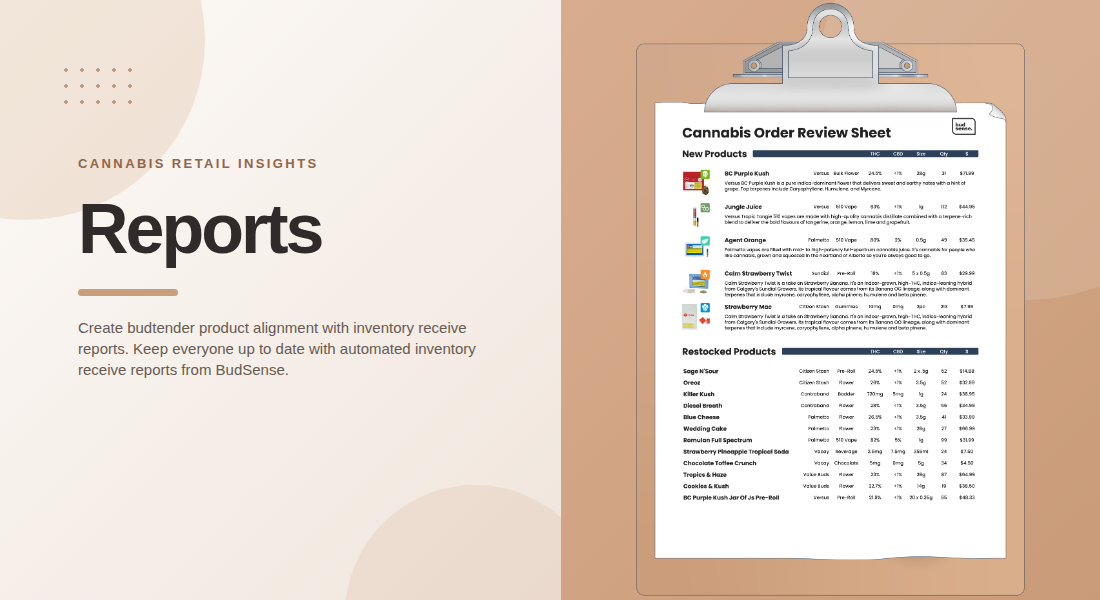
Managing several cannabis retail locations requires consistent communication, reliable inventory information, and well-organized staff workflows. Automated inventory receive reports can help retailers share updates about new and restocked products without relying on employees to prepare separate documents manually. When every location receives relevant product information on time, teams can stay better informed and provide more consistent customer service.
For multi-location operators, automation is especially useful because small administrative tasks can become difficult to manage when repeated across several stores.
1. Standardize Inventory Communication Across Locations
Each dispensary needs accurate information about the products it receives. When updates are shared through informal messages or separate spreadsheets, some employees may receive information late or miss important details.
Automated reports create a more consistent process for distributing inventory updates. Rather than relying on each manager to prepare a report independently, retailers can use a standardized format to communicate relevant product information.
This approach helps establish common procedures across locations while reducing repetitive administrative work. Teams can spend less time assembling updates and more time preparing for daily operations.
2. Keep Staff Informed About New Products
New product arrivals often require employees to become familiar with unfamiliar brands, product formats, descriptions, and pricing. Without a reliable communication process, staff may not have the information they need when customers ask questions.
An inventory receive report can give employees a convenient reference for newly received products. Depending on the available data, it may include product images, descriptions, prices, inventory quantities, and cannabinoid information.
Providing these details when new stock arrives helps teams prepare for customer conversations. Staff can review the information before products become a regular part of the store's selection.
3. Make Restocked Products Easier to Communicate
A product returning to inventory may be familiar to regular customers, but employees still need to know that it is available again. Restocking updates can be particularly useful when popular items have been unavailable for a period.
Automated reports can summarize restocked products so employees can quickly identify what has returned. This gives budtenders a practical reference when customers ask about previously unavailable items.
For multi-location retailers, it is important to distinguish between products restocked at one branch and those available throughout the entire business. Location-specific reporting helps staff communicate availability accurately instead of assuming that every store carries the same inventory.
4. Reduce Manual Reporting and Data Entry
Preparing reports manually can involve copying product details, checking inventory records, formatting documents, and distributing files to employees. Repeating these steps for every location creates more opportunities for errors and delays.
Automation can simplify the process by generating reports from connected systems, such as a point-of-sale (POS) or inventory platform. BudSense's Reports feature uses integrated data to generate inventory receive reports, helping retailers distribute product updates with less manual effort.
Reducing repetitive tasks also makes the process easier to maintain as the business grows. Retailers should still check that their integrations are working correctly and that the underlying product information is accurate.
5. Support More Consistent Customer Service
Customers may ask employees about product ingredients, formats, potency information, prices, or other characteristics. When staff have access to current product details, they can answer these questions more confidently or know where to verify the information.
Automated reports support this preparation by making updates available in an organized format. Instead of searching through multiple systems or asking another employee to locate product details, staff can consult the report as a starting point.
Reports should complement ongoing product training rather than replace it. Employees still need to understand the store's products, communicate responsibly, and confirm details when information is incomplete or unclear.
6. Improve Coordination Between Store Managers and Teams
Multi-location operations often involve both centralized management and local decision-making. Head office may establish shared reporting standards, while individual store managers need information relevant to their own inventory and staff.
A standardized reporting process helps connect these responsibilities. Managers can use inventory updates to prepare employees for new arrivals, identify products requiring additional training, and keep communication organized around stock changes.
Retailers should define who receives reports, who reviews them, and how important updates are communicated during busy shifts. Clear responsibilities help ensure that automated documents become part of the daily workflow rather than another email that employees overlook.
7. Deliver Reports at the Right Time
An inventory report is most useful when employees receive it close to the time products arrive. If information is distributed too late, staff may spend part of the day answering questions without having reviewed the latest product details.
Scheduled delivery can help retailers align reporting with their receiving process. BudSense supports automated report generation and delivery at regular intervals on order-receive days, helping teams access updates when they are needed.
Businesses should choose a schedule that matches their receiving practices and staffing arrangements. They should also make reports accessible to the employees who need them, including team members who may not regularly check a shared office computer.
8. Build a Scalable Workflow for Business Growth
As retailers open additional stores, the number of inventory updates, staff members, and communication requirements grows. A process that works for one location may become difficult to maintain across a larger network.
Automated reporting offers a repeatable approach that can support expansion. Standardized report formats, consistent delivery procedures, and clear responsibilities make it easier to introduce the same workflow at new locations.
Retailers should periodically review whether their reporting process is meeting staff needs. Feedback from budtenders and managers can reveal whether reports are easy to understand, arrive at the right time, and contain the details employees use most often.
For retailers seeking to coordinate product information and merchandising workflows, BudSense menu software offers tools designed for cannabis retail operations, including inventory receive reports.
Final Thoughts
Multi-location cannabis retailers need dependable ways to communicate inventory changes and prepare employees for new and restocked products. Automated inventory receive reports help standardize updates, reduce manual reporting, and make product information easier to distribute across store teams.
The best results come when automation is supported by accurate inventory data, suitable delivery schedules, and clear employee responsibilities. With these elements in place, retailers can simplify routine communication while helping staff provide more consistent and informed customer service.
FAQs
1. What are automated inventory receive reports?
They are reports generated from connected inventory or POS data to communicate new and restocked products to relevant employees.
2. How do automated reports help multi-location retailers?
They create a consistent reporting process across locations, reduce repeated administrative tasks, and help teams access relevant product information.
3. What information can an inventory receive report contain?
Depending on the reporting system, it may include new product details, images, descriptions, prices, inventory quantities, cannabinoid information, and summaries of restocked products.
4. Can reports be delivered automatically?
Yes. Reporting systems such as BudSense can automate report generation and schedule delivery around inventory receiving days.
5. Do automated reports replace product training?
No. Reports provide timely reference information, but retailers should continue product training and ensure employees verify details when necessary.

 English
 Arabic
 French
 Spanish
 Deutsch
 Turkish
 Dutch
Dutch
 Italiano
 Russian
 Romaian
 Portuguese (Brazil)
 Greek
Greek