


How Dispensary Websites Can Turn Product Data Into Useful Buying Guides
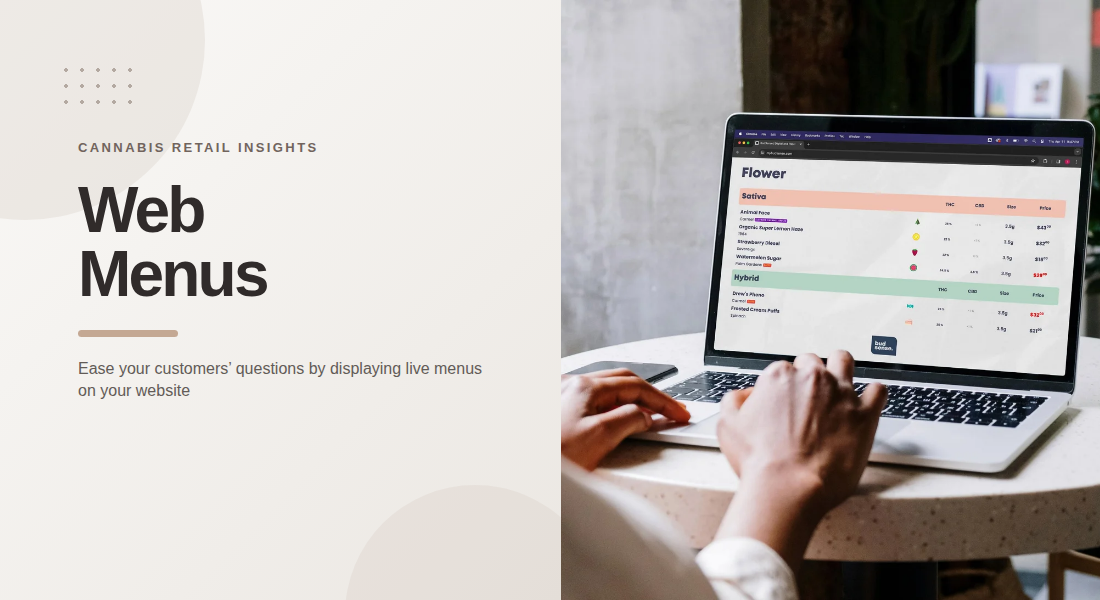
A cannabis retailer's website can do more than display a list of available products. With well-organized web menus, dispensaries can turn product data into practical buying guides that help customers understand their options before visiting a store. Clear categories, useful product attributes, and relevant comparisons can make a large catalog easier to navigate without overwhelming shoppers.
The key is to present product information in a way that answers real customer questions. Rather than showing disconnected names and prices, retailers can structure their online menus around the details people use to compare products, understand differences, and prepare for a conversation with store staff.
1. Turn Raw Product Data Into Useful Information
Retail inventory systems contain many details, including product names, brands, categories, package sizes, prices, and cannabinoid information. Although these details are valuable, displaying them without a clear structure may leave customers unsure where to begin.
A useful buying guide organizes these attributes around common questions. Customers might want to know which formats are available, how package sizes differ, or what information is listed for a particular product.
Retailers can use consistent product fields to make these comparisons easier. For example, presenting the same basic details for products within a category allows customers to review options without opening multiple pages or searching through inconsistent descriptions.
The aim is not to publish every available data field. It is to select the information that helps customers understand their choices and present it in a predictable format.
2. Build Menus Around Customer Questions
Traditional catalogs often follow the retailer's internal product structure. A customer, however, may approach the same inventory with a specific question or preference.
A well-designed online menu can bridge this gap by organizing products into meaningful sections. A dispensary might separate flower, pre-rolls, edibles, concentrates, and vapes, then provide additional ways to narrow the selection.
Useful sections can answer questions such as:
-
Which products belong to a particular category?
-
What options fall within a chosen price range?
-
Which products have a specified package size?
-
What cannabinoid information is available?
-
Which products are currently listed as available?
These groupings make the catalog easier to use without requiring retailers to write a separate article for every product type. They also create a more practical starting point for customers who know what they want to compare but are unfamiliar with the full inventory.
3. Use Filters to Create Focused Buying Guides
Filters can turn a large product catalog into smaller, more manageable selections. Instead of scrolling through every item, customers can focus on products that match relevant criteria.
Retailers may organize selections by product type, price range, strain classification, package size, or other available attributes. For example, a section featuring pre-rolls within a particular price range can help customers compare products that meet a practical budget.
BudSense supports Smart Filters that automatically group products according to configured criteria. These filters can help retailers maintain relevant menu sections as inventory changes, rather than manually rebuilding each selection whenever products are added.
Filters are most useful when their purpose is clear. Use straightforward labels and avoid creating so many overlapping categories that customers struggle to understand the differences between them.
4. Explain Product Differences With Consistent Details
A buying guide should help customers understand how products differ, not simply display more information.
Consistent product attributes make comparisons easier. Depending on the category, retailers may present price, package size, brand, listed THC or CBD content, and verified product descriptions.
For instance, two products may have different package sizes or prices. Showing those details in a consistent layout helps customers identify the difference without having to interpret unrelated descriptions.
Cannabinoid information should be labeled clearly, with consistent units and formats. Retailers should avoid implying that one number alone predicts a customer's experience or determines which product is appropriate for them.
Clear, factual descriptions allow customers to compare listed characteristics while leaving questions about individual suitability, responsible use, and product effects to qualified staff and appropriate product guidance.
5. Connect Buying Guides to Current Inventory
A buying guide becomes less useful when it features products that are no longer available. Outdated listings can lead to unnecessary questions, frustration, and a gap between what customers see online and what they encounter in the store.
Connecting online menus to inventory and point-of-sale systems can help keep product listings current. When information is synchronized correctly, customers can review a more accurate picture of the store's available selection.
BudSense's Web Menus are designed to integrate with inventory systems and display live menu information on a retailer's website. Smart Filters can also help organize products automatically according to defined criteria.
Retailers should still monitor synchronization, product categorization, and data quality. Incorrect product attributes or delayed inventory updates can affect what appears in a menu, even when an automated system is in place.
6. Make Product Information Easy to Read on Mobile Devices
Customers may visit a dispensary website from a phone while commuting, planning a store visit, or comparing products at home. A buying guide should therefore remain easy to use on smaller screens.
Mobile-friendly menus benefit from clear headings, readable text, concise product details, and controls that are easy to tap. Important information should not require excessive horizontal scrolling or repeated navigation between pages.
Retailers should test the actual menu on different screen sizes. Check whether product names are readable, filters are easy to use, and prices and specifications remain visible without clutter.
A mobile-friendly design can also help customers move between product categories more comfortably. When the layout is predictable, shoppers can focus on the information instead of figuring out how the website works.
7. Use Badges and Labels With a Clear Purpose
Badges and labels can help customers notice useful product characteristics, but they should communicate meaningful information rather than add decoration.
Retailers might use labels for verified product attributes, selected promotions, or clearly defined categories. The meaning of each label should be easy to understand, and the same rules should apply consistently throughout the menu.
BudSense supports badges, labels, and customizable menu sections. These features can help retailers organize product information and give selected items additional visibility.
However, too many labels can make a menu harder to read. Retailers should prioritize a small number of useful indicators and ensure that promotional claims comply with applicable advertising requirements.
8. Treat the Buying Guide as an Ongoing Process
Product catalogs change as new items arrive, prices are revised, and older products leave the inventory. A buying guide should be maintained as part of regular retail operations rather than treated as a one-time website project.
Retailers can review customer questions, staff feedback, search behavior where available, and common navigation problems to identify areas for improvement. If customers repeatedly ask about package sizes, for example, that information may need to be more visible.
It is also useful to review product categories and filter rules periodically. New inventory may require different classifications, while outdated sections can be removed or reorganized.
A consistent review process helps ensure that the buying guide remains relevant as the catalog evolves. The objective is to make information easier to understand over time, not simply to increase the amount of content on the page.
Connecting Product Data With Better Menu Management
Retailers looking to organize product details into accessible online menus can use BudSense menu software to support live web menus, customizable sections, smart filters, and consistent product information across their retail operations.
Final Thoughts
Dispensary websites can become more useful when product data is organized around the questions customers actually ask. Clear categories, consistent specifications, focused filters, and current inventory information help transform an extensive catalog into a practical buying guide.
The strongest approach combines accurate data with simple navigation and readable design. By reviewing their menus regularly and improving sections based on customer needs, cannabis retailers can make online product research more straightforward while helping shoppers prepare for informed conversations in-store.
Frequently Asked Questions
1. What is a web menu for a cannabis dispensary?
A web menu is an online listing of a dispensary's products and relevant details, such as prices, categories, package sizes, and available product information. It helps customers review the selection before visiting the store.
2. How can product data become a useful buying guide?
Retailers can organize product attributes into clear categories, comparison-friendly layouts, and filters that reflect common customer questions. Consistent information makes differences between products easier to understand.
3. Why are Smart Filters useful for online menus?
Smart Filters can automatically group products according to defined criteria, such as product type or price. This can reduce manual menu maintenance as inventory changes.
4. Should dispensary web menus work on mobile devices?
Yes. Mobile-friendly menus allow customers to browse product categories, review specifications, and use filters comfortably on smaller screens.
5. How often should online buying guides be updated?
Product information should be updated whenever relevant inventory, pricing, or specifications change. Retailers should also review menu organization periodically and check that automated data synchronization is working correctly.

 English
 Arabic
 French
 Spanish
 Portuguese
 Deutsch
 Turkish
 Dutch
Dutch
 Italiano
 Russian
 Romaian
 Portuguese (Brazil)