


AI Customer Conversation Checklist: Complete Guide for Ecommerce, Healthcare & Education
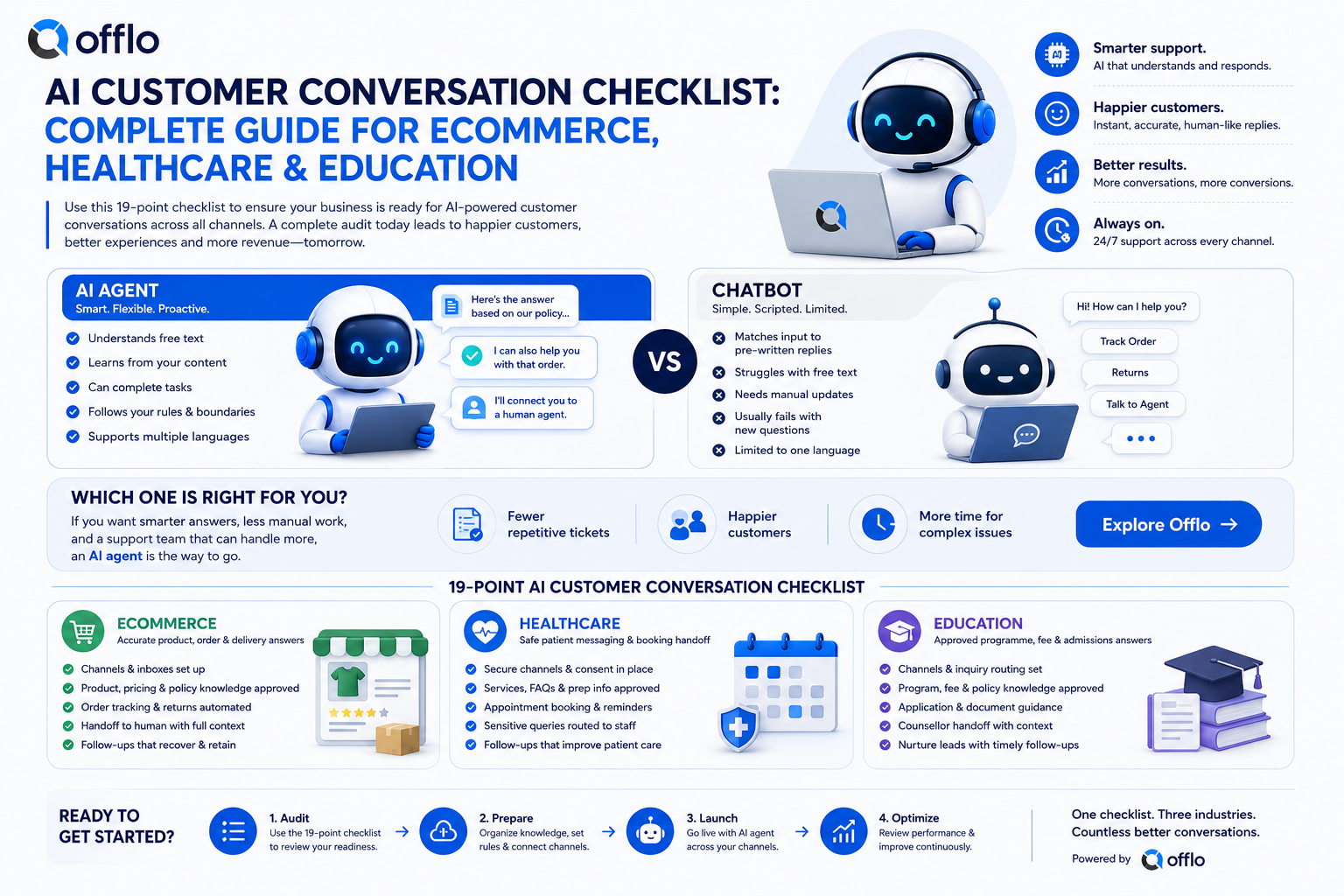
An AI customer conversation checklist is a standardized list of 19 checks that every online store, clinic and education team should pass before an AI agent answers customers on WhatsApp, Instagram, Messenger, web chat and email. It covers channels, approved knowledge, automation, CRM data and human handoff, and it can be completed in-house or with an AI revenue platform like Offlo.Ai.
If you run an ecommerce store, a clinic or an admissions team, the biggest barrier between you and automated support that actually works is a launch that goes wrong. Skip the audit and customers get wrong prices, missed bookings and cold leads. Pass it the first time and your AI agent can start resolving real conversations with confidence.
This guide gives you the complete AI customer support checklist, a scorecard for each industry, a breakdown of what to prepare, and every option for getting set up, including how to turn every customer conversation into revenue from one workspace with offlo.ai.
What is an AI customer conversation audit?
An AI customer conversation audit is a readiness review that confirms your channels, knowledge, automations and customer data can support an AI agent safely. It covers everything from WhatsApp connection and shared inbox ownership to approved answers, follow-up sequences and human handoff.
Ecommerce, healthcare and education teams run this audit before going live, then repeat it whenever products, prices, services or policies change. The results are recorded on a simple scorecard signed off by whoever owns customer communication, such as a support lead, practice manager or admissions head, and supported by a platform like the Offlo AI Agent.
Key facts about AI conversation audits:
• Recommended for every business before an AI agent goes live on any channel
• Worth repeating every quarter, or whenever your catalogue, fees or services change
• Covers 19 standardized checkpoint areas
• Can be completed in-house or with an all-in-one platform like offlo.ai
• Replies should come only from approved knowledge, and clinical or sensitive questions should always go to a human
The complete AI customer conversation checklist
Whether you sell on Shopify, run a multi-branch clinic or manage student admissions, the core AI customer support checklist is nearly identical. Here is every item your team should evaluate, grouped by category.
Channel and inbox checks
|
Checklist item |
What to look for |
Common fail reasons |
|
WhatsApp connection |
Business number connected, approved templates ready |
Unverified number, missing templates |
|
Website chat |
Chat widget live on key pages and loading fast |
Widget hidden on mobile, broken on checkout |
|
Instagram and Messenger |
DMs and comments flowing into one place |
Disconnected pages, missed DMs |
|
|
Support inbox connected and replies threaded |
Replies split across personal mailboxes |
|
Shared inbox |
One omnichannel inbox for every channel |
Customers answered twice or not at all |
|
Ownership |
Every conversation has a clear owner |
Unassigned chats, no escalation path |
|
Out-of-hours coverage |
Routine questions answered around the clock |
Messages waiting until morning |
|
Routing rules |
Enquiries reach the right branch, team or counsellor |
Everything lands in one queue |
|
Human handoff |
Full conversation passed to a person with context |
Customer repeats everything |
|
Reply speed |
First response within minutes, not hours |
Slow replies, cold leads |
AI agent and automation checks
|
Checklist item |
What to look for |
Common fail reasons |
|
Approved knowledge |
AI answers only from content you have approved |
Outdated FAQs, invented answers |
|
Store and data sync |
Products, orders and customers synced through integrations |
Stale stock, wrong prices |
|
Conversations turn into completed work, such as bookings or order lookups |
Manual copy-paste between tools |
|
|
Follow-ups and marketing campaigns |
Sequences stop when the customer replies |
Messages sent after a reply, no opt-in check |
|
Escalation rules |
Clear triggers for passing a chat to staff |
AI keeps replying when it should step aside |
Data, CRM and safety checks
|
Checklist item |
What to look for |
Common fail reasons |
|
Unified customer record |
One profile per person across channels in your https://offlo.ai/features/crm |
Duplicate contacts, lost history |
|
Tags, fields and segments |
Interest, intake, treatment or purchase data captured |
Free-text notes nobody can filter |
|
Safety boundaries |
No diagnosis, prescribing or unapproved fee promises |
AI answering clinical or policy questions |
|
Attribution and reporting |
Ad spend and conversations joined to orders or enrolments |
No view of which ad or message drove revenue |
Pro tip: The single most common reason teams fail this audit is an AI agent trained on out-of-date content. If your prices, fees or service list changed recently, update your knowledge base before you go live. Even one old delivery policy can cost you a sale.
Ecommerce AI audit scorecard: What you need
The ecommerce scorecard is a one-page document your team fills out after running through the 19-point checklist above. Without it, there is no clear record of whether your store is ready for AI agents to sell and support on its behalf.
How to get the ecommerce scorecard
You have three ways to build and complete your scorecard:
1. Build it in a spreadsheet. Copy the 19 checklist items above into a sheet and mark each one pass or fail. This works well for small Shopify stores.
2. Get it from an agency or consultant. Many ecommerce and marketing agencies run a conversation audit as part of onboarding. Ask for it by name when you book.
3. Complete it with Offlo. Instead of juggling tools, the Offlo ecommerce platform lets you connect Shopify, WhatsApp, Instagram, web chat and email in one workspace, so most of the checklist is verified as you set up. Its AI agent answers with your store already in view, covers product discovery, cart recovery and order support, and joins ad spend to purchases so you can see ROAS per ad.
What the ecommerce scorecard includes
A standard scorecard asks for:
• Store information: Store name, platform (such as Shopify), channels connected, number of products
• Owner information: Name, role and the person responsible for customer communication
• 19-point checklist: Pass or fail for each item in the checklist above
• Approval note: Confirmation that the AI agent is trained only on approved knowledge
• Date: Review again each quarter, or after any major catalogue or policy change
Once your scorecard is complete, connect your channels and switch on your agent. If you want a walkthrough, you can book a demo or check pricing first.
Healthcare and education AI scorecards: Requirements by industry
The healthcare and education scorecards follow the same 19-point checklist as ecommerce, but each has its own focus. The good news: most of the setup carries over, so if you run more than one type of business you usually need to build the foundation only once.
How to get the healthcare scorecard
Clinics, dental practices and wellness centres can complete the scorecard through:
• An internal review. Practice managers walk through the 19 checks and record the result.
• A compliance or operations lead. Many groups already have someone who signs off patient-facing communication.
• Online with Offlo. The Offlo healthcare platform handles non-clinical patient messaging such as enquiries, bookings, reminders, confirmations and follow-ups across WhatsApp, Instagram, Messenger and web chat. Replies come only from the service lists, price ranges and policies your clinic approves.
How to get the education scorecard
Schools, colleges, universities, academies and coaching centres can complete theirs through:
• An admissions team review. Counsellors confirm programme, fee, intake and deadline content is current.
• A campaign and CRM audit. Check that every enquiry becomes a record with a clear next step.
• Online with Offlo. The Offlo education platform works as an AI admissions assistant and CRM. It answers programms questions around the clock, qualifies each enquiry and passes the full conversation to a counsellor.
Does one setup work for every industry?
Yes, in most cases. The 19-point checklist is standardized, so your channels, shared inbox, CRM and automation foundation can be reused across ecommerce, healthcare and education. There are a few exceptions, though:
• Healthcare: The AI must not diagnose, prescribe or handle symptoms, medication or test results. Those messages go to your clinical team.
• Education: Fee, intake and deadline answers must match your approved programms content, with counsellor handoff for complex cases.
• Ecommerce: Product, order and customer data must stay in sync with your store, such as Shopify, so answers about stock and delivery stay accurate.
When in doubt, start with the shared checklist and add the industry-specific checks afterwards. If something is unclear, the Offlo FAQ or the team via the contact page can point you to the right setup.
Final thoughts
Passing the checklist is the difference between an AI agent that quietly loses customers and one that turns every conversation into revenue. Check your channels, approve your knowledge, connect your CRM and keep humans in the loop for anything sensitive.
If you want one workspace for sales, support and follow-up, offlo.ai brings the AI agent, inbox, automation, CRM and marketing together. Explore the setups for ecommerce, healthcare and education, or book a demo to see it with your own channels.

 English
 Arabic
 French
 Portuguese
 Deutsch
 Turkish
 Dutch
Dutch
 Italiano
 Russian
 Romaian
 Portuguese (Brazil)
 Greek
Greek