


Do You Really Need a Business Server? A Plain Guide for Irish SMEs
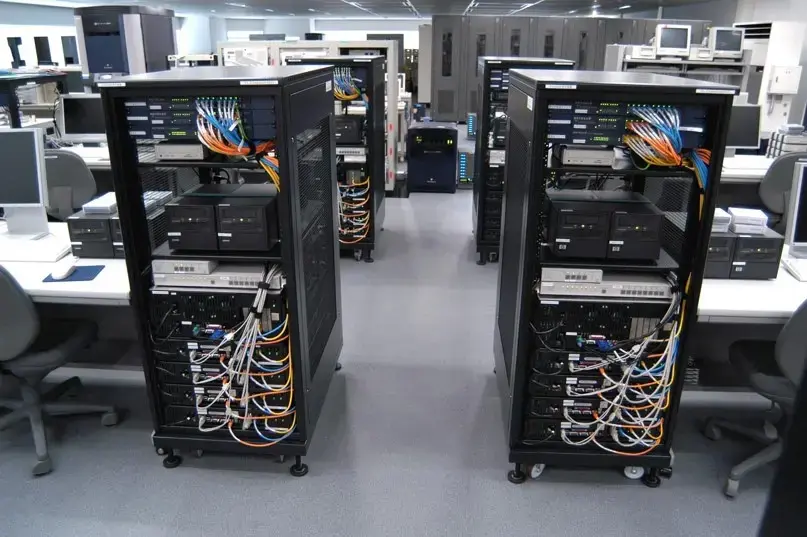
Ask three IT people whether a small business needs a server and you will probably get three different answers. One will say cloud has made servers obsolete. Another will say every office with more than a handful of staff should have one. The third will say it depends. The third answer is the honest one, but it is only useful if someone explains what it depends on.
This guide is written for Irish small and medium-sized businesses that want a straight answer. It explains what a server actually does, the situations where one is worth having, the situations where it is not, and how to think about cost, licensing, and support. If you are researching business servers ireland owners can buy and rely on, the first step is deciding whether you need one at all.
What a Business Server Actually Is
A server is a computer built to provide services to other computers on your network. It is not simply a faster desktop. It is designed to run continuously, handle multiple users at once, and protect the data it holds.
Typical jobs for a business server include:
- Storing shared files so staff can all work from the same folders
- Running business applications such as accounting, stock, or practice management software
- Managing user accounts, logins, and permissions
- Hosting backups and keeping copies of important data
- Running email, print management, or remote access services
- Hosting virtual machines for specialised software
Servers usually differ from desktop PCs in several ways: redundant components such as power supplies and drives, error-correcting memory, remote management features, and hardware designed to run around the clock.
The Big Question: Server, Cloud, or Both?
Most small businesses today can run a lot of their work in the cloud. Email, documents, accounting, and customer systems are often available as online subscriptions. That has changed the question from “do we need a server?” to “which things need to live on one?”
Cloud services suit businesses that are mostly office based, work with standard software, and have reliable broadband. They reduce hardware costs and remove the need to maintain equipment on site.
On-premises servers suit businesses with specific needs: software that must run locally, large files that are slow to move over the internet, strict control over where data is stored, or poor connectivity.
A hybrid approach combines both. Everyday collaboration might sit in the cloud, while a local server holds large files, runs specialist software, or provides fast local backup.
None of these is automatically right. The best choice reflects how your team actually works.
Signs You Probably Need a Business Server
A server tends to make sense if several of these apply to you:
- You use software that must be installed and run on a local machine rather than in a browser
- Your team works with large files such as CAD drawings, video, or design assets, and needs fast access
- You want central control over user accounts, permissions, and security
- Your internet connection is not reliable enough to depend on cloud access all day
- You have regulatory or client requirements about where data is stored
- You need a central, protected place for backups
- You have more than a few staff sharing the same data and files
- You run a line of business application provided by a specialist supplier that recommends a server
Signs You Might Not Need One
You may be fine without a server if:
- You are a sole trader or a very small team with simple needs
- Your work runs almost entirely on cloud software
- Your files are small and comfortably stored in a cloud drive
- You have no specialist local software
- You prefer predictable monthly costs over a capital purchase
- You have no space or support arrangement for equipment on site
For some very small businesses, a good quality NAS (network attached storage) device offers shared storage and backup at a lower cost than a full server. It is not a replacement for a server in every situation, but it can be enough for file sharing and basic backup.
Server vs NAS: A Quick Comparison
A NAS is a dedicated storage device. It is good for shared files, backups, and simple access control. It is usually cheaper, easier to manage, and uses less power.
A server is a general purpose machine. It can run applications, manage users through a directory service, host virtual machines, and do far more than store files. It costs more and typically needs more expertise to manage.
If your only need is shared storage and backup, a NAS may be enough. If you need to run software, manage logins centrally, or host several services, a server is the stronger choice.
Types of Business Server
Tower servers. A standalone unit that looks like a large desktop PC. Tower servers are common in small offices because they do not need a rack, are generally quieter, and often cost less than rack models. They are a practical first server for many SMEs.
Rack servers. Designed to be mounted in a standard rack cabinet. They save space and suit businesses with several servers, a comms cabinet, or plans to grow. They are usually louder, so they are better placed in a dedicated room or cabinet.
Mini and compact servers. Small, low power units suited to light workloads, branch offices, or businesses with limited space.
Virtualised setups. One physical server runs several virtual machines, each acting as a separate server. This can reduce hardware needs and simplify management, but it adds licensing and configuration considerations.
What a Business Server Costs
The cost of a server is more than the price on the box. A realistic budget includes:
- The server hardware itself, which varies widely with specification
- The operating system licence
- Client Access Licences (CALs) for users or devices connecting to it
- Storage, including drives configured for redundancy
- A UPS to protect against power problems
- Backup hardware or software, and ideally an off-site copy
- Installation and configuration
- Ongoing support, maintenance, and warranty extensions
- Replacement and upgrade costs over its lifespan
Many businesses plan a server’s working life at around five years, after which performance, support, and warranty coverage become concerns. Spreading the total cost over that period gives a more honest picture than looking at the purchase price alone.
Prices vary a great deal depending on specification, so ask for an itemised quote rather than a single headline figure.
Licensing: The Part People Get Wrong
Licensing is one of the most common sources of confusion and unexpected cost. If you plan to run Windows Server, keep these points in mind:
- The server operating system is licensed separately from the hardware
- Current versions are generally licensed by processor core, with a minimum number of cores to be licensed
- You also need CALs for the users or devices that access the server
- Virtualisation can change how many licences you need
- Different editions are built for different business sizes, so check which one fits your user and device count
Getting licensing wrong can mean paying for more than you need, or running something that is not compliant. Confirm the details with your supplier before you commit.
Security and Data Protection
For Irish businesses handling personal data, data protection obligations under GDPR apply regardless of where data is stored. A server gives you more control over where your data sits, but it also makes you responsible for protecting it.
Practical steps include:
- Keep the operating system and firmware up to date
- Use strong, unique passwords and multi-factor authentication where available
- Limit access to only the people who need it
- Encrypt sensitive data and backups
- Keep the server in a secure, ventilated space with restricted access
- Monitor for hardware faults and unusual activity
- Document who is responsible for the server
If you handle sensitive client or employee information, take the time to understand your obligations and seek advice where you are unsure.
Backup and Continuity: Do Not Skip This
A server holds a lot of valuable data in one place, which makes it a single point of failure unless you plan for that. A solid approach includes:
- Regular automated backups
- At least one copy stored off site or in a separate secure location
- Periodic test restores to confirm the backups actually work
- A UPS so power cuts or surges do not corrupt data or damage hardware
- A written plan for what to do if the server fails
Redundant drives help protect against a single disk failure, but they are not a substitute for backup. A server can fail in ways that redundancy does not cover, including accidental deletion, malware, and theft.
Where to Put the Server
Small businesses often underestimate the physical requirements. Choose a location that offers:
- Good ventilation and a temperature that stays reasonable
- Protection from dust, water, and accidental knocks
- A secure, lockable space
- Stable power, ideally with UPS protection
- Enough room for cabling and future equipment
- A noise level your staff can tolerate, which matters most with rack equipment
A cupboard with no airflow is a common cause of overheating and early failure.
Questions to Ask Before You Buy
- What exactly do we need the server to do today, and in three to five years?
- How many users and devices will connect to it?
- Do we need to run any specialist software locally?
- What is the total cost over five years, not just the purchase price?
- How will we back it up, and where will the copies live?
- Who will manage and support it?
- What happens to our business if it is down for a day?
- Does the warranty include on-site support, and how quickly are parts supplied?
- Can it be upgraded as we grow?
- Would a cloud or hybrid solution meet our needs at lower risk?
If you cannot answer most of these, speak to someone who can help you scope the requirement before you spend money.
Buying Locally in Ireland
Servers are not a purchase to make blind. Buying from an Irish supplier gives you easier access to support, simpler warranty handling, and the protections that Irish consumer and business rules provide. It also means you can talk through your needs with someone who understands the local market and the practical realities of running IT in a small Irish business.
PC Systems is an Irish IT hardware supplier that can help businesses weigh up their options for business servers ireland SMEs can depend on, from choosing the right type of system to planning storage, backup, and power protection. Come prepared with the number of users, the software you run, and a realistic budget, and ask for an itemised quote that covers hardware, licensing, and support.
Common Mistakes to Avoid
- Buying a server because it feels like a business should have one
- Skipping the requirement review and buying based on price alone
- Forgetting to budget for licences, backup, and UPS
- Assuming redundancy replaces backup
- Placing the server somewhere hot, dusty, or unsecured
- Leaving updates and monitoring to chance
- Ignoring the warranty and support terms
- Not planning for growth, so the server is outgrown within a year or two
- Dismissing cloud or hybrid options without looking at them honestly
Frequently Asked Questions
Q: Does a small business really need a server?
A: Not always. If your work runs mostly on cloud software and your files are small, you may not need one. A server makes sense when you run local software, share large files, need central control of users and security, or want a protected place for backups.
Q: What is the difference between a server and a NAS?
A: A NAS is a dedicated storage device that suits file sharing and backup. A server is a general purpose machine that can run applications, manage user accounts, and host several services. A server costs more and needs more expertise, but it can do more.
Q: How much do business servers ireland SMEs buy typically cost?
A: It varies widely with specification, licensing, storage, and support. Beyond the hardware, budget for the operating system, CALs, backup, a UPS, installation, and ongoing support. Ask for an itemised quote so you can see the full cost.
Q: Is a tower server or a rack server better for a small office?
A: Tower servers are common in small offices because they are generally quieter, need no rack, and often cost less. Rack servers suit businesses with several servers or a dedicated comms cabinet, where space efficiency matters.
Q: What are CALs and do I need them?
A: Client Access Licences give users or devices the legal right to connect to a Windows Server. Most businesses running Windows Server need them, and the number depends on your users or devices and the licensing model you choose.
Q: How long does a business server last?
A: Many businesses plan for around five years, although it depends on the hardware and workload. After that, performance, support, and warranty coverage can become issues, so it is sensible to plan for replacement.
Q: Can I use the cloud instead of buying a server?
A: Often, yes. Many businesses run email, files, and applications in the cloud. A local server is still worthwhile for specialist software, large files, poor connectivity, or specific data control needs. Some businesses use a hybrid of both.
Q: Is a RAID setup the same as a backup?
A: No. RAID protects against certain drive failures but does not protect against deletion, malware, theft, or other disasters. You still need separate backups, ideally including an off-site copy.
Conclusion
A business server ireland is a tool, not a status symbol. For some Irish SMEs it is the right foundation for storage, applications, security, and backup. For others, cloud services or a simple NAS will do the job at lower cost and with less maintenance. The answer depends on how your team works, what software you rely on, and how much risk you can tolerate.
Start with your requirements, count the full cost over the server’s life, plan for backup and power protection, and be honest about who will look after it. If you want help deciding what fits your business, PC Systems can talk you through the options and help you choose a setup that suits your needs and budget.

 English
 Arabic
 French
 Spanish
 Portuguese
 Deutsch
 Turkish
 Dutch
Dutch
 Italiano
 Romaian
 Portuguese (Brazil)
 Greek
Greek