


How to Record Smooth Motorcycle Ride Videos: Settings and Setup
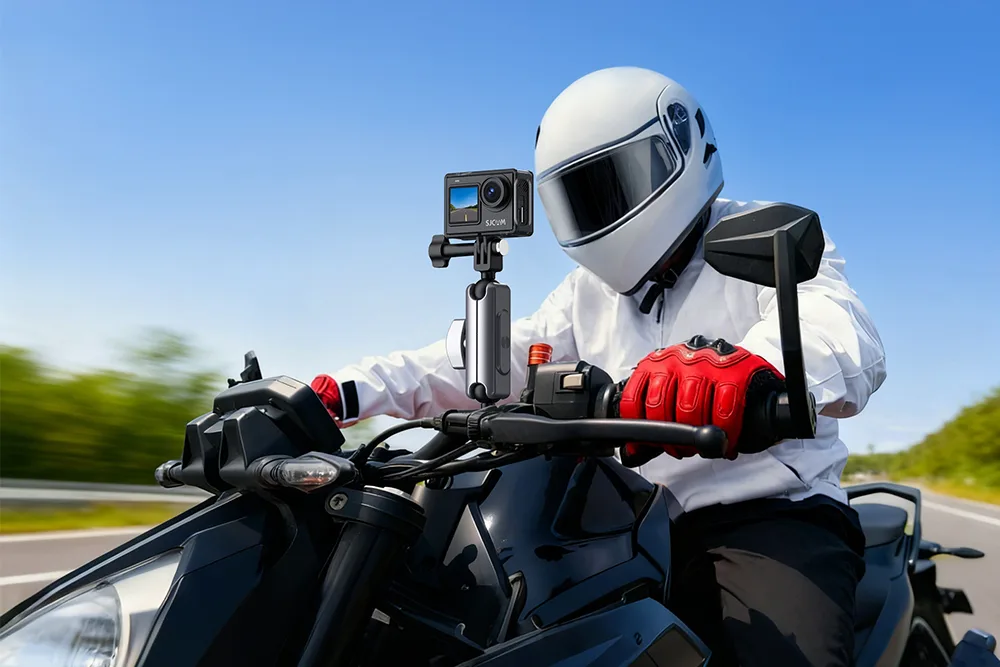
Nothing ruins a ride video faster than shaky, jittery footage. Engine vibration, road imperfections, wind buffeting, and mounting flex all conspire to turn a beautiful stretch of road into a nauseating blur. The good news is that smooth motorcycle footage is mostly a matter of preparation: the right mounting, the right settings, and a few habits that make a big difference. This guide walks through practical setup and configuration tips for motorcycle action cameras, from choosing a mount to dialing in stabilization and frame rates.
Start With the Mount: Smoothness Begins Here
No amount of in-camera stabilization can fully rescue a shaky mount. Where and how you attach the camera matters more than almost anything else.
Mount to the bike, not the rider—usually. Body-mounted cameras (helmet, chest) move with your head and torso, which adds unwanted motion. Bike-mounted cameras on rigid, well-damped surfaces tend to produce steadier results. That said, a chin-mounted helmet camera offers a great rider’s-eye perspective, so the best setup often combines both.
Avoid high-vibration surfaces. Handlebar clamps and mirror stems transmit engine and road vibration directly into the camera. Fairing panels and tank mounts can flex and buzz at speed. Prefer solid frame or subframe mounting points, or use vibration-damping accessories.
Use dampers. Rubber-damped mounts, silicone isolation pads, or dedicated anti-vibration inserts dramatically reduce high-frequency jitter from engine vibration. This is one of the cheapest upgrades with the biggest payoff.
Check tightness regularly. Vibration loosens hardware. Use a thread-locking compound on critical bolts and check mounts at every stop on long rides.
Choose the Right Stabilization Mode
Modern motorcycle action cameras offer several stabilization options:
- Standard electronic stabilization: Smooths most vibration and small bumps. Great for general riding.
- Enhanced or “boost” stabilization: Crops the image more but delivers the smoothest results. Ideal for highway and rough roads.
- Horizon lock / leveling: Keeps the horizon flat through leaning and bumpy corners. Excellent for cinematic ride footage.
- 360-degree capture: Allows you to reframe shots in editing and apply stabilization after the fact—very forgiving if your mount is imperfect.
A practical default for most riders: enable stabilization at its strongest setting for highway and gravel, and use horizon lock for scenic touring footage.
Set Resolution and Frame Rate Thoughtfully
Higher resolution is not automatically better. Consider these guidelines:
- 4K at 30fps: Best for cinematic footage and detail; heavier files and more heat.
- 4K at 60fps: Great for action and slow-motion options, but increases heat and storage demands—watch for thermal shutdown on hot days.
- 2.7K or 1080p at 60fps: A smart touring choice; smaller files, less heat, and smoother-looking motion.
- Higher frame rates (120fps+): Reserve for short action clips, as files balloon quickly and stabilization may weaken.
For long touring days, many riders record at 2.7K/60 or 1080p/60 to balance quality, storage, and heat.
Shutter Speed and Motion Blur
Smooth-looking footage depends on shutter speed as much as stabilization. A good rule of thumb is to set shutter speed at roughly double the frame rate—for example, 1/120s at 60fps. This produces natural motion blur that makes footage feel smooth rather than stuttery. On bright days, this may require ND filters to avoid overexposure, since action cameras often lack adjustable apertures. ND filters are a small investment that noticeably improves the look of sunny ride videos.
Manage Wind, Heat, and Power
Wind noise dominates motorcycle audio. Use a foam windscreen or a camera with wind-noise reduction, or plan to replace audio in editing with music or a voiceover.
Heat is a hidden enemy of smooth recording. Sealed, waterproof cameras can overheat during long 4K sessions. Record in shorter clips, avoid direct sun when parked, and use lower resolutions on very hot days.
Power matters for continuous filming. Carry spare batteries, or use sealed external power solutions if your camera supports them. Running out of battery mid-ride is the most common reason riders miss the best footage.
Composition and Framing Tips
- Keep the horizon level. Horizon lock helps, but mounting the camera level to begin with saves headaches in editing.
- Show context. A slightly wider field of view reveals the road and scenery, making footage more engaging than a tight crop.
- Vary angles. Alternate between a forward-facing bike mount and a helmet view for visual interest.
- Anticipate the shot. Start recording before the scenic corner, not in the middle of it.
A Practical Pre-Ride Checklist
Before every ride, confirm:
- Mount is tight, damped, and level
- Stabilization and horizon lock are enabled as desired
- Resolution and frame rate suit the day’s conditions
- ND filter fitted for bright sunlight
- Battery charged and spares packed
- Storage card formatted and empty
- Lens clean and windscreen fitted
Final Thoughts
Smooth motorcycle ride videos are not the product of one magic setting—they come from a system: a solid, damped mount; the right stabilization mode; sensible resolution and frame-rate choices; shutter speed matched to motion; and disciplined power and heat management. Modern motorcycle action cameras make excellence easier than ever, but the rider still controls the variables that matter most. Set up deliberately, test your configuration on a short ride, and refine from there. Do that, and your footage will look as good as the road felt.

 English
 Arabic
 Spanish
 Portuguese
 Deutsch
 Turkish
 Dutch
Dutch
 Italiano
 Russian
 Romaian
 Portuguese (Brazil)
 Greek
Greek